保存树莓派操作系统到一个img文件,并在适当的时机写回mini sd 卡。备份用的Win32 Disk Imager,写回用的dd
摘要:作者临时借用树莓派的minisd卡,先备份系统后写入其他镜像。半年后恢复系统时遇到问题:该卡因测试ESP32C3和FreeBSD导致Windows无法识别,最终在FreeBSD下使用dd命令成功写入镜像。树莓派成功启动,网络配置正常。整个过程展示了多系统环境下存储卡处理的复杂性。
有一次临时需要mini sd卡,手边没有空余的,就把树莓派正在用的一张卡拿来救济。
先把这张树莓派系统的卡进行备份,写入 rassby.img 文件。
我记得当时写入是用的win32 Disk Imager软件
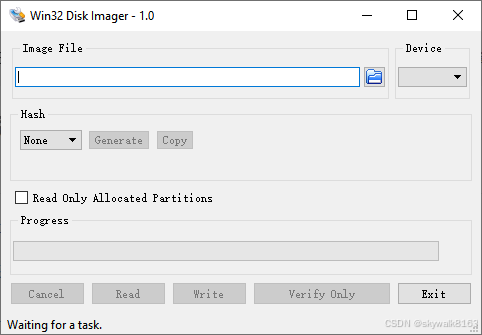
在完成临时任务后(大约半年后),将系统写回到Mini sd卡。
这里还碰到了问题,就是因为那张卡被用来测试ESP32C3下的 tf卡写入操作,所以Windows下是认不出来的。这里情况比较复杂,其实这张卡后来被用于写FreeBSD的启动盘,另外这张卡比较老了,读写都容易出问题,所以才导致Windows下无法识别盘符。
只好到FreeBSD下进行写入操作,使用dd
# dd if=FreeBSD-{rel-latest}-RELEASE-amd64-memstick.img of=/dev/da0 bs=1M conv=sync写完后插入树莓派,一次启动成功!
Linux rbpi 6.6.51+rpt-rpi-v7 #1 SMP Raspbian 1:6.6.51-1+rpt3 (2024-10-08) armv7l
The programs included with the Debian GNU/Linux system are free software;
the exact distribution terms for each program are described in the
individual files in /usr/share/doc/*/copyright.
Debian GNU/Linux comes with ABSOLUTELY NO WARRANTY, to the extent
permitted by applicable law.
ifconfig
eth0: flags=4163<UP,BROADCAST,RUNNING,MULTICAST>  mtu 1500
        inet 192.168.0.99  netmask 255.255.255.0  broadcast 192.168.0.255
        inet6 fe80::ba27:ebff:fe81:6646  prefixlen 64  scopeid 0x20<link>
        inet6 2409:8a3c:40c0:3488:ba27:ebff:fe81:6646  prefixlen 64  scopeid 0x0<global>
        ether b8:27:eb:81:66:46  txqueuelen 1000  (Ethernet)
        RX packets 274  bytes 34092 (33.2 KiB)
        RX errors 0  dropped 0  overruns 0  frame 0
        TX packets 170  bytes 22216 (21.6 KiB)
        TX errors 0  dropped 0 overruns 0  carrier 0  collisions 0
智能硬件社区聚焦AI智能硬件技术生态,汇聚嵌入式AI、物联网硬件开发者,打造交流分享平台,同步全国赛事资讯、开展 OPC 核心人才招募,助力技术落地与开发者成长。
更多推荐
 3
3 0
0- 0


 已为社区贡献4条内容

所有评论(0)