MimiClaw(mimi OpenClaw):30元成本芯片ESP32S3上的口袋 AI 助理
MimiClaw 把一块小小的 ESP32-S3 开发板变成你的私人 AI 助理。插上 USB 供电,连上 WiFi,通过 Telegram 跟它对话 — 它能处理你丢给它的任何任务,还会随时间积累本地记忆不断进化 — 全部跑在一颗拇指大小的芯片上。(由于 Telegram 未在中国大陆备案,且其端到端加密特性不符合国内互联网监管要求,该应用长期处于“”状态。)所以这次实践就只进行到安装固件,
MimiClaw 把一块小小的 ESP32-S3 开发板变成你的私人 AI 助理。插上 USB 供电,连上 WiFi,通过 Telegram 跟它对话 — 它能处理你丢给它的任何任务,还会随时间积累本地记忆不断进化 — 全部跑在一颗拇指大小的芯片上。(由于 Telegram 未在中国大陆备案,且其端到端加密特性不符合国内互联网监管要求,该应用长期处于“无法直连”状态。)所以这次实践就只进行到安装固件,连上wifi就结束了。
整个硬件只需要成本30元的一块ESP32S3单片机。ESP32S3的基本使用见ESP官方网站。
repo:https://github.com/memovai/mimiclaw
镜像:https://gitcode.com/RealGao/mimiclaw
安装MimiClaw
首先需要在一台pc机上编译MiMiClaw成可以写入ESP32S3的固件。
先下载MimiClaw源代码
git clone https://github.com/memovai/mimiclaw
# 或者用gitcode加速
git clone https://gitcode.com/RealGao/mimiclaw
进入目录:E:\github\mimiclaw>
设置单片机为esp32s3
idf.py set-target esp32s3设置完成
/esp-idf-v5.5.1/components/wear_levelling G:/Espressif/frameworks/esp-idf-v5.5.1/components/wifi_provisioning G:/Espressif/frameworks/esp-idf-v5.5.1/components/wpa_supplicant G:/Espressif/frameworks/esp-idf-v5.5.1/components/xtensa
-- Configuring done (45.1s)
-- Generating done (4.6s)
-- Build files have been written to: E:/github/mimiclaw/build
编译固件
idf.py fullclean && idf.py build编译完成:
Project build complete. To flash, run:
idf.py flash
or
idf.py -p PORT flash
or
python -m esptool --chip esp32s3 -b 460800 --before default_reset --after hard_reset write_flash --flash_mode dio --flash_size 16MB --flash_freq 80m 0x0 build\bootloader\bootloader.bin 0x8000 build\partition_table\partition-table.bin 0xf000 build\ota_data_initial.bin 0x20000 build\mimiclaw.bin 0x420000 build\spiffs.bin
or from the "E:\github\mimiclaw\build" directory
python -m esptool --chip esp32s3 -b 460800 --before default_reset --after hard_reset write_flash "@flash_args"
查看esp32s3的端口,比如可能是com4(我是通过用arduino这个软件查看到的端口)
后来在windows10的设备管理器里,看到是com5,后来又看到是com4
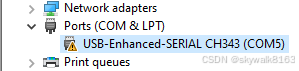
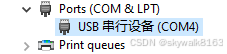
弄明白了,原来esp32s3板子有两个接口,一个usb,一个com,usb口是COM4,com口是COM5
将固件写入flash
接了usb口,因此是COM4
# 错误写法,用com4
# idf.py -p com4 flash
# 注意,要用大写的COM
idf.py -p COM4 flash
写好了
Writing at 0x00133d26... (95 %)
Writing at 0x00139db3... (97 %)
Writing at 0x0013fa0f... (100 %)
Wrote 1199872 bytes (752099 compressed) at 0x00020000 in 9.0 seconds (effective 1064.8 kbit/s)...
Hash of data verified.
Compressed 3072 bytes to 160...
Writing at 0x00008000... (100 %)
Wrote 3072 bytes (160 compressed) at 0x00008000 in 0.1 seconds (effective 213.7 kbit/s)...
Hash of data verified.
Compressed 8192 bytes to 31...
Writing at 0x0000f000... (100 %)
Wrote 8192 bytes (31 compressed) at 0x0000f000 in 0.2 seconds (effective 434.4 kbit/s)...
Hash of data verified.
Compressed 12386304 bytes to 23038...
Writing at 0x00420000... (50 %)
Writing at 0x00c6d0fc... (100 %)
Wrote 12386304 bytes (23038 compressed) at 0x00420000 in 45.7 seconds (effective 2166.4 kbit/s)...
Hash of data verified.

Leaving...
Hard resetting via RTS pin...
Done
监控和配置
监控和配置需要连ESP32S3的com口,也就是正面看板子的右下角的那个接口。波特率是115200
可以直接用idf.py monitor接入
idf.py monitoridf.py monitor
Executing action: monitor
Serial port COM4
Connecting...
Detecting chip type... ESP32-S3
Running idf_monitor in directory E:\github\mimiclaw
Executing "G:\Espressif\python_env\idf5.5_py3.11_env\Scripts\python.exe G:\Espressif\frameworks\esp-idf-v5.5.1\tools/idf_monitor.py -p COM4 -b 115200 --toolchain-prefix xtensa-esp32s3-elf- --target esp32s3 --revision 0 E:\github\mimiclaw\build\mimiclaw.elf E:\github\mimiclaw\build\bootloader\bootloader.elf --force-color -m 'G:\Espressif\python_env\idf5.5_py3.11_env\Scripts\python.exe' 'G:\Espressif\frameworks\esp-idf-v5.5.1\tools\idf.py'"...
--- Warning: GDB cannot open serial ports accessed as COMx
--- Using \\.\COM4 instead...
--- esp-idf-monitor 1.8.0 on \\.\COM4 115200
--- Quit: Ctrl+] | Menu: Ctrl+T | Help: Ctrl+T followed by Ctrl+H
ESP-ROM:esp32s3-20210327
Build:Mar 27 2021
rst:0x15 (USB_UART_CHIP_RESET),boot:0xa (SPI_FAST_FLASH_BOOT)
Saved PC:0x40048d1c
--- 0x40048d1c: uart_rx_one_char in ROM
SPIWP:0xee
mode:DIO, clock div:1
load:0x3fce2820,len:0x1700
load:0x403c8700,len:0xec0
--- 0x403c8700: _stext at ??:?
load:0x403cb700,len:0x31c0
entry 0x403c894c
--- 0x403c894c: call_start_cpu0 at G:/Espressif/frameworks/esp-idf-v5.5.1/components/bootloader/subproject/main/bootloader_start.c:25
I (24) boot: ESP-IDF v5.5.1-dirty 2nd stage bootloader
I (24) boot: compile time Mar 8 2026 20:51:36
I (25) boot: Multicore bootloader
I (26) boot: chip revision: v0.2
I (28) boot: efuse block revision: v1.3
I (32) qio_mode: Enabling default flash chip QIO
I (36) boot.esp32s3: Boot SPI Speed : 80MHz
I (40) boot.esp32s3: SPI Mode : QIO
I (44) boot.esp32s3: SPI Flash Size : 16MB
I (47) boot: Enabling RNG early entropy source...
I (52) boot: Partition Table:
I (54) boot: ## Label Usage Type ST Offset Length
I (61) boot: 0 nvs WiFi data 01 02 00009000 00006000
I (67) boot: 1 otadata OTA data 01 00 0000f000 00002000
I (74) boot: 2 phy_init RF data 01 01 00011000 00001000
I (80) boot: 3 ota_0 OTA app 00 10 00020000 00200000
I (87) boot: 4 ota_1 OTA app 00 11 00220000 00200000
I (93) boot: 5 spiffs Unknown data 01 82 00420000 00bd0000
I (100) boot: 6 coredump Unknown data 01 03 00ff0000 00010000
I (107) boot: End of partition table
I (110) esp_image: segment 0: paddr=00020020 vaddr=3c0d0020 size=3d344h (250692) map
I (155) esp_image: segment 1: paddr=0005d36c vaddr=3fc9d400 size=02cach ( 11436) load
I (158) esp_image: segment 2: paddr=00060020 vaddr=42000020 size=c953ch (824636) map
I (281) esp_image: segment 3: paddr=00129564 vaddr=3fca00ac size=02580h ( 9600) load
I (283) esp_image: segment 4: paddr=0012baec vaddr=40374000 size=193bch (103356) load
I (304) esp_image: segment 5: paddr=00144eb0 vaddr=50000000 size=00020h ( 32) load
I (315) boot: Loaded app from partition at offset 0x20000
I (315) boot: Disabling RNG early entropy source...
I (325) octal_psram: vendor id : 0x0d (AP)
I (325) octal_psram: dev id : 0x02 (generation 3)
I (326) octal_psram: density : 0x03 (64 Mbit)
I (327) octal_psram: good-die : 0x01 (Pass)
I (332) octal_psram: Latency : 0x01 (Fixed)
I (336) octal_psram: VCC : 0x01 (3V)
I (340) octal_psram: SRF : 0x01 (Fast Refresh)
I (345) octal_psram: BurstType : 0x01 (Hybrid Wrap)
I (350) octal_psram: BurstLen : 0x01 (32 Byte)
I (354) octal_psram: Readlatency : 0x02 (10 cycles@Fixed)
I (360) octal_psram: DriveStrength: 0x00 (1/1)
I (364) MSPI Timing: PSRAM timing tuning index: 5
I (368) esp_psram: Found 8MB PSRAM device
I (372) esp_psram: Speed: 80MHz
I (375) cpu_start: Multicore app
I (390) cpu_start: Pro cpu start user code
I (390) cpu_start: cpu freq: 240000000 Hz
I (390) app_init: Application information:
I (391) app_init: Project name: mimiclaw
I (394) app_init: App version: v0.1.0-101-g3a1c1e9
I (399) app_init: Compile time: Mar 8 2026 20:50:20
I (404) app_init: ELF file SHA256: c12c0229a...
I (408) app_init: ESP-IDF: v5.5.1-dirty
I (412) efuse_init: Min chip rev: v0.0
I (416) efuse_init: Max chip rev: v0.99
I (420) efuse_init: Chip rev: v0.2
I (424) heap_init: Initializing. RAM available for dynamic allocation:
I (430) heap_init: At 3FCA9540 len 000401D0 (256 KiB): RAM
I (435) heap_init: At 3FCE9710 len 00005724 (21 KiB): RAM
I (441) heap_init: At 3FCF0000 len 00008000 (32 KiB): DRAM
I (446) heap_init: At 600FE000 len 00001FE8 (7 KiB): RTCRAM
I (451) esp_psram: Adding pool of 8192K of PSRAM memory to heap allocator
I (458) spi_flash: detected chip: generic
I (461) spi_flash: flash io: qio
I (464) sleep_gpio: Configure to isolate all GPIO pins in sleep state
I (471) sleep_gpio: Enable automatic switching of GPIO sleep configuration
I (477) main_task: Started on CPU0
I (487) esp_psram: Reserving pool of 96K of internal memory for DMA/internal allocations
I (487) main_task: Calling app_main()
I (487) mimi: ========================================
I (497) mimi: MimiClaw - ESP32-S3 AI Agent
I (497) mimi: ========================================
I (507) mimi: Internal free: 300723 bytes
I (507) mimi: PSRAM free: 8386156 bytes
I (1127) mimi: SPIFFS: total=11378081, used=5271
I (1127) bus: Message bus initialized (queue depth 16)
I (1127) memory: Memory store initialized at /spiffs
I (1127) skills: Initializing skills system
I (1137) skills: Skills system ready (3 built-in)
I (1137) session: Session manager initialized at /spiffs/sessions
I (1147) pp: pp rom version: e7ae62f
I (1147) net80211: net80211 rom version: e7ae62f
I (1157) wifi:wifi driver task: 3fcee980, prio:23, stack:6656, core=0
I (1167) wifi:wifi firmware version: 14da9b7
I (1167) wifi:wifi certification version: v7.0
I (1167) wifi:config NVS flash: enabled
I (1167) wifi:config nano formatting: disabled
I (1177) wifi:Init data frame dynamic rx buffer num: 6
I (1177) wifi:Init static rx mgmt buffer num: 5
I (1177) wifi:Init management short buffer num: 32
I (1187) wifi:Init dynamic tx buffer num: 32
I (1187) wifi:Init static tx FG buffer num: 2
I (1197) wifi:Init static rx buffer size: 1600
I (1197) wifi:Init static rx buffer num: 3
I (1197) wifi:Init dynamic rx buffer num: 6
I (1207) wifi_init: rx ba win: 3
I (1207) wifi_init: accept mbox: 6
I (1207) wifi_init: tcpip mbox: 16
I (1217) wifi_init: udp mbox: 6
I (1217) wifi_init: tcp mbox: 6
I (1217) wifi_init: tcp tx win: 5760
I (1227) wifi_init: tcp rx win: 5760
I (1227) wifi_init: tcp mss: 1440
I (1227) wifi_init: WiFi IRAM OP enabled
I (1237) wifi_init: WiFi RX IRAM OP enabled
I (1237) wifi: WiFi manager initialized
W (1237) telegram: No Telegram bot token. Use CLI: set_tg_token <TOKEN>
W (1247) feishu: No Feishu credentials. Use CLI: set_feishu_creds <APP_ID> <APP_SECRET>
W (1257) llm: No API key. Use CLI: set_api_key <KEY>
W (1257) web_search: No search API key. Use CLI: set_search_key <KEY>
I (1267) tools: Registered tool: web_search
I (1267) tools: Registered tool: get_current_time
I (1277) tools: Registered tool: read_file
I (1277) tools: Registered tool: write_file
I (1287) tools: Registered tool: edit_file
I (1287) tools: Registered tool: list_dir
I (1287) tools: Registered tool: cron_add
I (1297) tools: Registered tool: cron_list
I (1297) tools: Registered tool: cron_remove
I (1307) tools: Tools JSON built (9 tools)
I (1307) tools: Tool registry initialized
I (1707) cron: No cron file found, starting fresh
I (1707) heartbeat: Heartbeat service initialized (file: /spiffs/HEARTBEAT.md, interval: 1800s)
I (1707) agent: Agent loop initialized
Type 'help' to get the list of commands.
Use UP/DOWN arrows to navigate through command history.
Press TAB when typing command name to auto-complete.
Your terminal application does not support escape sequences.
Line editing and history features are disabled.
On Windows, try using Windows Terminal or Putty instead.
mimi> I (2727) cli: Serial CLI started
W (2757) wifi: No WiFi credentials. Use CLI: wifi_set <SSID> <PASS>
W (2757) mimi: No WiFi credentials. Set MIMI_SECRET_WIFI_SSID in mimi_secrets.h
I (2767) mimi: MimiClaw ready. Type 'help' for CLI commands.
I (2767) main_task: Returned from app_main()也可以使用arduino连COM5口进行监控。
显示help
串口连上后,输入help,显示:
1:49:22.103 -> set_wifi  <ssid> <password>
21:49:22.103 ->   Set WiFi SSID and password (e.g. set_wifi MySSID MyPass)
21:49:22.103 ->         <ssid>  WiFi SSID
21:49:22.136 ->     <password>  WiFi password
21:49:22.136 ->
21:49:22.136 -> wifi_status
21:49:22.136 ->   Show WiFi connection status
21:49:22.136 ->
21:49:22.136 -> wifi_scan
21:49:22.136 ->   Scan and list nearby WiFi APs
21:49:22.136 ->
21:49:22.136 -> set_tg_token  <token>
21:49:22.136 ->   Set Telegram bot token
21:49:22.269 -> config_reset
21:49:22.269 ->   Clear all NVS overrides, revert to build-time defaults
21:49:22.305 ->
21:49:22.305 -> heartbeat_trigger
21:49:22.305 ->   Manually trigger a heartbeat check
21:49:22.305 ->
21:49:22.305 -> cron_start
21:49:22.305 ->   Start cron scheduler timer now
21:49:22.305 ->
21:49:22.305 -> tool_exec
21:49:22.305 ->   Execute a registered tool: tool_exec <name> '{...json...}'
21:49:22.305 ->
21:49:22.305 -> restart
21:49:22.305 ->   Restart the device
配置wifi
set_wifi showmemoney "password"
21:51:51.370 -> I (953447) wifi: WiFi credentials saved for SSID: showmemoney
21:51:51.370 -> WiFi credentials saved. Restart to apply.
restart 重启ESP32S3,重启后,可以发现已经连上WIFI

配置命令列表
运行时配置(存入 NVS,覆盖编译时默认值):
mimi> wifi_set MySSID MyPassword   # 换 WiFi
mimi> set_tg_token 123456:ABC...   # 换 Telegram Bot Token
mimi> set_api_key sk-ant-api03-... # 换 API Key(Anthropic 或 OpenAI)
mimi> set_model_provider openai    # 切换提供商(anthropic|openai)
mimi> set_model gpt-4o             # 换模型
mimi> set_proxy 192.168.1.83 7897  # 设置代理
mimi> clear_proxy                  # 清除代理
mimi> set_search_key BSA...        # 设置 Brave Search API Key
mimi> config_show                  # 查看所有配置(脱敏显示)
mimi> config_reset                 # 清除 NVS,恢复编译时默认值
调试与运维:
mimi> wifi_status              # 连上了吗?
mimi> memory_read              # 看看它记住了什么
mimi> memory_write "内容"       # 写入 MEMORY.md
mimi> heap_info                # 还剩多少内存?
mimi> session_list             # 列出所有会话
mimi> session_clear 12345      # 删除一个会话
mimi> heartbeat_trigger           # 手动触发一次心跳检查
mimi> cron_start                  # 立即启动 cron 调度器
mimi> restart                     # 重启

智能硬件社区聚焦AI智能硬件技术生态,汇聚嵌入式AI、物联网硬件开发者,打造交流分享平台,同步全国赛事资讯、开展 OPC 核心人才招募,助力技术落地与开发者成长。
更多推荐


 24
24 0
0- 0


 已为社区贡献4条内容

所有评论(0)