ESP32wifi获取心知天气信息
这样避免了“Wi‑Fi 还没连上就发 HTTP → DNS/连接失败”。
·
总体流程:
1) 触发时机:等 Wi‑Fi 真正联网后再请求
- 在 main/app_ui.c 的 Wi‑Fi 事件回调 event_handler() 里监听:
- IP_EVENT_STA_GOT_IP(拿到 IP)
- 只有进到这个分支时才创建天气任务:
- xTaskCreate(weather_task, "weather_task", ...)
这样避免了“Wi‑Fi 还没连上就发 HTTP → DNS/连接失败”。
2) 请求任务:独立 FreeRTOS 任务里拉一次天气
- weather_task() 做三件事:
- 调用 weather_get_now(&now)
- 成功则更新 UI、打印日志
- 最后 vTaskDelete(NULL) 退出(基础版只拉一次)
3) HTTP 请求:用 ESP‑IDF 自带 esp_http_client
- 在 main/weather/weather_client.c 的 weather_get_now():
- 拼接 URL:/v3/weather/now.json?key=...&location=...&language=zh-Hans&unit=c
- esp_http_client_init → esp_http_client_perform
- 读取响应 body 到 buffer(JSON 字符串)
- 打印 HTTP status、Raw weather JSON
4) JSON 解析:用 ESP‑IDF 自带 cJSON
- 从返回 JSON 中取字段(results[0]):
- location.name → 城市(locate)
- now.text → 天气描述(weather)
- now.temperature → 温度
- last_update → 时间戳(用于同步日期/时钟)
解析后填到 weather_now_t 结构体。
5) UI 更新:通过 lvgl_port_lock() 安全更新主界面控件
- 在 weather_task() 成功后:
- lvgl_port_lock(0) 进入临界区
- 更新 screen_1_label_1(城市)、screen_1_label_2(天气)、screen_1_label_3(温度)
- 强制 weather/locate/temperature 使用 font_alipuhui20,保证中文显示正常
- 解析 last_update,更新 screen_1_datetext_1(日期)并同步数字时钟的内部计数
- lvgl_port_unlock() 退出临界区
详细代码:
weather_client.c
#include <string.h>

#include "esp_http_client.h"
#include "esp_log.h"
#include "cJSON.h"

#include "weather_client.h"

static const char *TAG_WEATHER = "weather_client";

/* 心知天气 now 接口基础 URL(使用 HTTP,便于在嵌入式环境下调试。
 * 如需 HTTPS,可将 http 改为 https,并配置证书或相关 TLS 选项。 */
#define WEATHER_API_BASE_URL "http://api.seniverse.com/v3/weather/now.json"

/* TODO: 如需保护密钥,可改为从配置或 NVS 读取 */
#define WEATHER_API_KEY      "your_api"
#define WEATHER_LOCATION     "beijing"
#define WEATHER_LANG         "zh-Hans"
#define WEATHER_UNIT         "c"

#define WEATHER_HTTP_BUF_SIZE 512

esp_err_t weather_get_now(weather_now_t *out)
{
    if (out == NULL) {
        return ESP_ERR_INVALID_ARG;
    }

    char url[256];
    int n = snprintf(url, sizeof(url),
                     WEATHER_API_BASE_URL "?key=%s&location=%s&language=%s&unit=%s",
                     WEATHER_API_KEY, WEATHER_LOCATION, WEATHER_LANG, WEATHER_UNIT);
    if (n <= 0 || n >= (int)sizeof(url)) {
        ESP_LOGE(TAG_WEATHER, "URL buffer too small");
        return ESP_ERR_NO_MEM;
    }

    esp_http_client_config_t config = {
        .url = url,
        .method = HTTP_METHOD_GET,
        .timeout_ms = 5000,
    };

    esp_http_client_handle_t client = esp_http_client_init(&config);
    if (client == NULL) {
        ESP_LOGE(TAG_WEATHER, "Failed to init http client");
        return ESP_FAIL;
    }

    // 1) 建立连接
    esp_err_t err = esp_http_client_open(client, 0 /* write_len=0 for GET */);
    if (err != ESP_OK) {
        ESP_LOGE(TAG_WEATHER, "Failed to open HTTP connection: %s", esp_err_to_name(err));
        esp_http_client_cleanup(client);
        return err;
    }

    // 2) 读取响应头信息
    int content_length = esp_http_client_fetch_headers(client);
    int status_code = esp_http_client_get_status_code(client);
    ESP_LOGI(TAG_WEATHER, "HTTP status = %d, content_length = %d", status_code, content_length);

    // 3) 读取 body(可以按需多次 read,这里因为数据不大直接一次性读完)
    char buffer[WEATHER_HTTP_BUF_SIZE] = {0};
    int total_read = 0;
    while (1) {
        int read_len = esp_http_client_read(client,
                                            buffer + total_read,
                                            sizeof(buffer) - 1 - total_read);
        if (read_len <= 0) {
            break;  // <=0 表示读完或者出错
        }
        total_read += read_len;
        if (total_read >= (int)sizeof(buffer) - 1) {
            break;  // 防止溢出
        }
    }
    buffer[total_read] = '\0';

    if (total_read <= 0) {
        ESP_LOGE(TAG_WEATHER, "No data in HTTP body");
        esp_http_client_close(client);
        esp_http_client_cleanup(client);
        return ESP_FAIL;
    }

    // 4) 关闭连接
    esp_http_client_close(client);
    esp_http_client_cleanup(client);

    ESP_LOGI(TAG_WEATHER, "Raw weather JSON: %s", buffer);

    // 5) 用 cJSON 解析(这里你可以继续沿用现在的解析代码)
    cJSON *root = cJSON_Parse(buffer);
    if (root == NULL) {
        ESP_LOGE(TAG_WEATHER, "Failed to parse JSON");
        return ESP_FAIL;
    }

    esp_err_t ret = ESP_FAIL;
    cJSON *results = cJSON_GetObjectItem(root, "results");
    if (cJSON_IsArray(results) && cJSON_GetArraySize(results) > 0) {
        cJSON *first = cJSON_GetArrayItem(results, 0);
        if (cJSON_IsObject(first)) {
            cJSON *loc = cJSON_GetObjectItem(first, "location");
            cJSON *now = cJSON_GetObjectItem(first, "now");
            if (cJSON_IsObject(loc) && cJSON_IsObject(now)) {
                cJSON *name = cJSON_GetObjectItem(loc, "name");
                cJSON *text = cJSON_GetObjectItem(now, "text");
                cJSON *temp = cJSON_GetObjectItem(now, "temperature");
                if (cJSON_IsString(name) && cJSON_IsString(text) && cJSON_IsString(temp)) {
                    memset(out, 0, sizeof(*out));
                    strncpy(out->city, name->valuestring, sizeof(out->city) - 1);
                    strncpy(out->text, text->valuestring, sizeof(out->text) - 1);
                    strncpy(out->temperature, temp->valuestring, sizeof(out->temperature) - 1);
                    ret = ESP_OK;
                }
            }
        }
    }

    cJSON_Delete(root);

    if (ret == ESP_OK) {
        ESP_LOGI(TAG_WEATHER, "Weather: city=%s, text=%s, temp=%s",
                 out->city, out->text, out->temperature);
    } else {
        ESP_LOGE(TAG_WEATHER, "Failed to extract weather fields from JSON");
    }

    return ret;
}
weather_client.h
/**
 * @file weather_client.h
 * @brief Simple client for Seniverse (心知天气) "now" weather API.
 */

#ifndef WEATHER_CLIENT_H
#define WEATHER_CLIENT_H

#ifdef __cplusplus
extern "C" {
#endif

#include "esp_err.h"

typedef struct {
    char city[32];         /**< 城市名称,例如 "北京" */
    char text[16];         /**< 天气描述,例如 "晴" */
    char temperature[8];   /**< 温度字符串,例如 "6" 或 "6℃" */
} weather_now_t;

/**
 * @brief 同步获取当前天气("now" 接口)。
 *
 * 需要在 WiFi 已经成功联网之后再调用。
 *
 * @param[out] out  解析后的天气结果结构体
 * @return esp_err_t
 *         - ESP_OK:       请求并解析成功
 *         - 其他错误码:    HTTP、解析或网络错误
 */
esp_err_t weather_get_now(weather_now_t *out);

#ifdef __cplusplus
}
#endif

#endif /* WEATHER_CLIENT_H */
Cmakelist
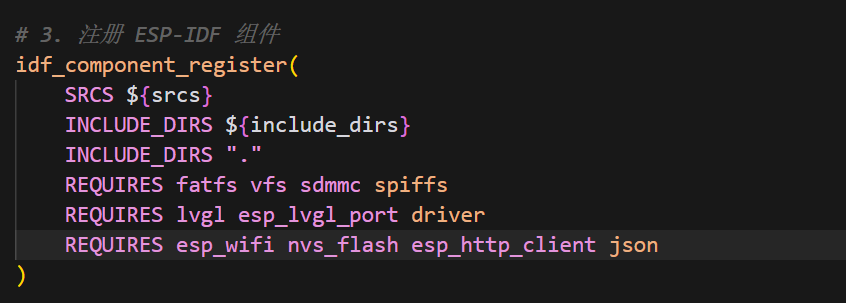
添加esp_http_client和json这两个组件的声明
main.c
 // 在这里启动天气任务(只拉一次天气)
        xTaskCreate(weather_task, "weather_task", 4096, NULL, 5, NULL);
app_main里创建一次天气任务就行
app_ui.c
添加ui的更新
/* 更新主界面的天气相关 UI */
        lvgl_port_lock(0);
        if (lv_obj_is_valid(guider_ui.screen_1_label_1)) {
            // 城市名称
            lv_label_set_text(guider_ui.screen_1_label_1, now.city);
            lv_obj_set_style_text_font(guider_ui.screen_1_label_1, &font_alipuhui20, LV_PART_MAIN);
        }
        if (lv_obj_is_valid(guider_ui.screen_1_label_2)) {
            /* 天气描述(中文) */
            lv_label_set_text(guider_ui.screen_1_label_2, now.text);
            lv_obj_set_style_text_font(guider_ui.screen_1_label_2, &font_alipuhui20, LV_PART_MAIN);
        }
        if (lv_obj_is_valid(guider_ui.screen_1_label_3)) {
            /* 温度显示为 “数字+℃”,使用中文字体 */
            char tbuf[16];
            snprintf(tbuf, sizeof(tbuf), "%s℃", now.temperature);
            lv_label_set_text(guider_ui.screen_1_label_3, tbuf);
            lv_obj_set_style_text_font(guider_ui.screen_1_label_3, &font_alipuhui20, LV_PART_MAIN);
        }
        if (lv_obj_is_valid(guider_ui.screen_1_datetext_1) && now.last_update[0] != '\0') {
            int year, month, day, hour, min, sec;
            if (sscanf(now.last_update, "%4d-%2d-%2dT%2d:%2d:%2d",
                       &year, &month, &day, &hour, &min, &sec) == 6) {
                char date_buf[20];
                snprintf(date_buf, sizeof(date_buf), "%04d/%02d/%02d", year, month, day);
                lv_label_set_text(guider_ui.screen_1_datetext_1, date_buf);

                /* 同步更新数字时钟初始值(12 小时制) */
                int hour12 = hour;
                const char *meridiem = "AM";
                if (hour == 0) {
                    hour12 = 12;
                    meridiem = "AM";
                } else if (hour == 12) {
                    hour12 = 12;
                    meridiem = "PM";
                } else if (hour > 12) {
                    hour12 = hour - 12;
                    meridiem = "PM";
                } else {
                    meridiem = "AM";
                }
                screen_1_digital_clock_1_hour_value = hour12;
                screen_1_digital_clock_1_min_value = min;
                screen_1_digital_clock_1_sec_value = sec;
                strncpy(screen_1_digital_clock_1_meridiem, meridiem, 3);
            }
        }
        lvgl_port_unlock();
智能硬件社区聚焦AI智能硬件技术生态,汇聚嵌入式AI、物联网硬件开发者,打造交流分享平台,同步全国赛事资讯、开展 OPC 核心人才招募,助力技术落地与开发者成长。
更多推荐
 10
10 0
0- 0


 已为社区贡献1条内容

所有评论(0)