让你的浏览器可以操作你的嵌入式linux开发板(buildroot、busybox、ubuntu讲解)
本文介绍了一种基于lighttpd+CGI+HTML的轻量级嵌入式Linux远程控制方案,使浏览器可直接操作开发板。该方案通过lighttpd服务器接收HTTP请求,调用CGI脚本执行硬件控制和信息读取,无需复杂框架即可实现跨设备控制。文章详细说明了配置流程:安装lighttpd、修改配置文件、编写CGI脚本(led_ctrl.sh和sysinfo.sh)及HTML界面,最终实现浏览器按钮控制LE
让你的浏览器可以操作你的嵌入式linux开发板
本文概述
从事嵌入式Linux开发多年,传统图形界面方案(Qt、LVGL)虽能满足需求,但跨设备控制(手机/电脑)需要额外开发;本文介绍一种零前端框架、轻量、低成本的嵌入式 Linux 远程控制方案:基于 lighttpd + CGI + 原生HTML 实现浏览器控制开发板、实时查看系统信息。无需学习复杂的前后端框架,纯嵌入式思路实现跨设备(手机 / 电脑 / 平板)控制。
技术路线描述
主要使用lighttpd + CGI + html来实现,总体流程,浏览器 → HTTP 请求 → lighttpd 服务器 → 分发 CGI 脚本 → 执行硬件控制 / 读取信息 → 返回结果给浏览器,下面大概的介绍下他们各自的作用:
- lighttpd:轻量 Web 服务器,作为浏览器和嵌入式设备之间的桥梁,接收浏览器的 HTTP 请求(如:按钮等控件),并返回响应(CGI 脚本的执行结果),管理静态资源(HTML/CSS/JS)和动态请求(CGI 脚本)的分发,一般类似的服务器还有Nginx、Apache、thttpd等,这里选择lighttpd是因为其轻量、配置简单;
- CGI:轻量动态逻辑执行器,用于处理需要 “动态计算 / 操作” 的请求,CGI 脚本执行具体逻辑,把执行结果(比如 “硬件执行成功”)返回给 lighttpd ,然后 lighttpd 再返回给浏览器;
- HTML:用户交互的可视化界面,展示静态布局(设备列表、按钮、状态显示),通过 JS 发起 HTTP 请求(调用 CGI 脚本),实现 “硬件控制”、“查看信息” 等交互;
需求及需求分析
为了比较方便理解,本文暂定一个简单的需求:需要在浏览器上实现两个按钮,点击两个按钮能够控制嵌入式板子的led灯,然后,每隔1秒获取板子的信息在浏览器上显示。
- 编写HTML实现网页界面显示,点击按钮时调用CGI执行控制led的脚本,并显示控制结果,定时获取板子信息并显示。
- 编写脚本供CGI调用,实现led控制和板子信息获取。
- 配置lighttpd服务器,指定CGI和HTML等配置。
正式开始
安装lighttpd
因为嵌入式环境特殊,这里介绍3种方式,本文使用的是apt-get的方式
- 如果板子使用的是busybox这种超轻量的文件系统,需要下载lighttpd源码,交叉编译后拷贝至文件系统。
- 如果板子使用的是buildroot文件系统,需要配置lighttpd,然后打包镜像烧录。
- 如果运行了ubuntu这种发行版文件系统,直接板端执行sudo apt-get install lighttpd安装即可。
验证是否安装成功,在板端执行lighttpd -v看到版本号即可
修改lighttpd配置文件
- 因为我是Ubuntu的系统,下载后这个服务就自动运行了,用到的配置文件是/etc/lighttpd/lighttpd.conf,如果其它系统没有自动运行也没关系,修改完/etc/lighttpd/lighttpd.conf后,执行/usr/sbin/lighttpd -D -f /etc/lighttpd/lighttpd.conf即可;

- 修改/etc/lighttpd/lighttpd.conf文件:
# 加载 CGI 模块(核心!)
server.modules += ( "mod_cgi" )

# 网页根目录
server.document-root = "/var/www"
server.port = 80
server.indexfiles = ("index.html")

# 配置 CGI:所有 .sh 文件交给 /bin/sh 执行
cgi.assign = ( ".sh" => "/bin/sh" )

# 限定 /cgi-bin/ 路径下的所有文件都当作 CGI 处理
$HTTP["url"] =~ "^/cgi-bin/" {
    cgi.assign = ( "" => "/bin/sh" )
}

# 其他基础配置
dir-listing.activate = "enable"
mimetype.assign = ( ".html" => "text/html", ".txt" => "text/plain" )
- 重新运行sudo systemctl restart lighttpd.service(其它系统杀掉lighttpd,然后执行/usr/sbin/lighttpd -D -f /etc/lighttpd/lighttpd.conf)
编写CGI脚本
-
这个文件根据/etc/lighttpd/lighttpd.conf文件指定,需要放到/var/www/cgi-bin/目录下;
-
在 /var/www/cgi-bin/ 目录下创建两个脚本:led_ctrl.sh 和 sysinfo.sh(记得赋予可执行权限);

-
led_ctrl.sh是控制led的,我这里并没有真正控制硬件,只是个示例(加了一些ls、pwd命令便于查看),如下:
#!/bin/sh
# 1. 输出正确的HTTP头(必须指定charset=utf-8)
echo "Content-Type: text/html; charset=utf-8"
# 2. 必须输出一个空行,分隔头和内容(CGI协议强制要求!)
echo ""

# 3. 解析LED控制参数
LED_CMD=$(echo "$QUERY_STRING" | grep -o "led=on\|led=off" | cut -d'=' -f2)

# 4. 执行LED命令并输出HTML
if [ "$LED_CMD" = "on" ]; then
    ls
    echo "<h1>✅ LED 已打开</h1>"
elif [ "$LED_CMD" = "off" ]; then
    pwd
    echo "<h1>❌ LED 已关闭</h1>"
else
    echo "<h1>⚠️ 无效操作</h1>"
fi

# 5. 返回主页链接
echo "<br><a href='/'>返回管理界面</a>"
- sysinfo.sh则实现了设备的一些信息的查看,如下:
#!/bin/sh
echo "Content-Type: text/plain"
echo ""

# 显示开发板信息(可自定义)
echo "===== 开发板系统信息 ====="
echo "IP地址: $(hostname -I | cut -d' ' -f1)"
echo "系统时间: $(date)"
echo "运行时间: $(uptime | cut -d',' -f1)"
echo "CPU信息: $(grep 'model name' /proc/cpuinfo | head -1 | cut -d: -f2)"
echo "内存信息: $(free -h | grep -E '内存|Mem' | awk '{print "总内存:"$2" 可用:"$7}')"
编写index.html文件(需要大概了解下html语法)
- 这个文件根据/etc/lighttpd/lighttpd.conf文件指定,需要放到/var/www目录下;
- /var/www/index.html内容如下
<!DOCTYPE html>
<html>
<head>
    <meta charset="utf-8">
    <title>开发板 Web 管理界面</title>
    <style>
        body { font-family: Arial; margin: 50px; }
        button { padding: 10px 20px; margin: 10px; font-size: 16px; }
        .info { margin-top: 30px; padding: 20px; background: #f5f5f5; }
        .tip { margin-top: 20px; color: #2ecc71; font-size: 18px; }
    </style>
</head>
<body>
    <h1>开发板 Web 管理界面</h1>

    <!-- LED按钮(异步,不跳转页面) -->
    <button onclick="controlLed('on')">打开 LED</button>
    <button onclick="controlLed('off')">关闭 LED</button>

    <!-- 操作提示区域 -->
    <div class="tip" id="tip"></div>

    <!-- 系统信息展示 -->
    <div class="info">
        <h3>开发板系统信息</h3>
        <pre id="sysinfo"></pre>
    </div>

    <script>
        // 异步控制LED(页面不跳转)
        function controlLed(cmd) {
            fetch(`/cgi-bin/led_ctrl.sh?led=${cmd}`)
                .then(res => res.text())
                .then(data => {
                    // 提取纯文本提示(去掉HTML标签)
                    const tip = data.replace(/<[^>]+>/g, '');
                    document.getElementById('tip').textContent = tip;
                    // 3秒后自动清空提示
                    setTimeout(() => {
                        document.getElementById('tip').textContent = '';
                    }, 3000);
                });
        }

        // 定时刷新系统信息(1秒一次)
        function refreshSysinfo() {
            fetch('/cgi-bin/sysinfo.sh')
                .then(res => res.text())
                .then(data => {
                    document.getElementById('sysinfo').textContent = data;
                });
        }
        refreshSysinfo();
        setInterval(refreshSysinfo, 1000);
    </script>
</body>
</html>
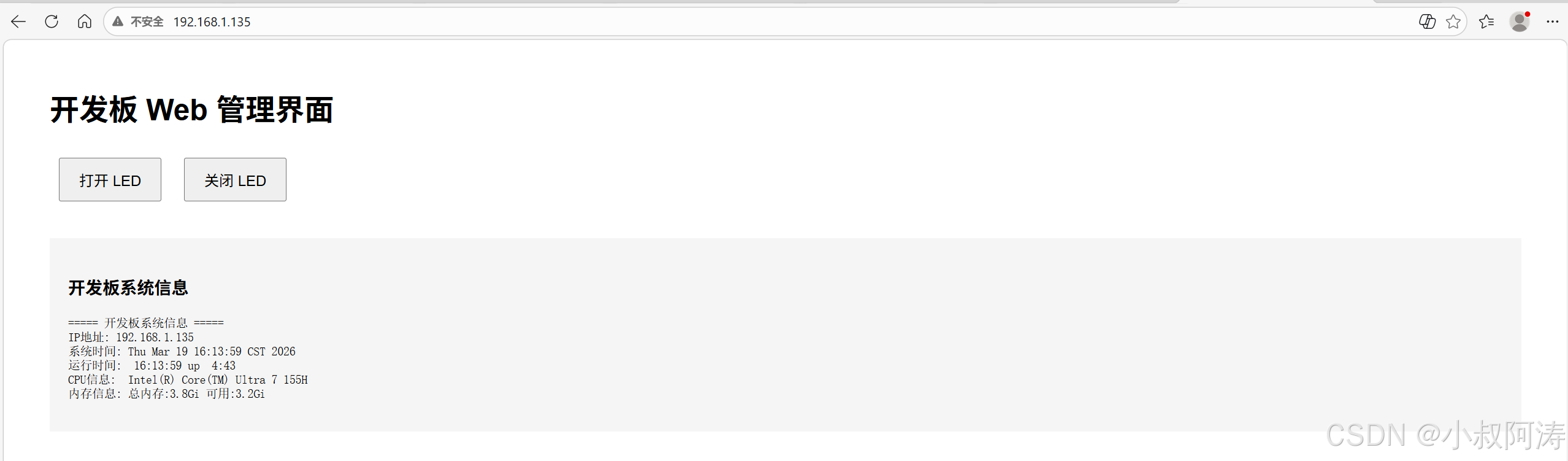
- 然后电脑输入开发板ip,会看到如下界面,点击“打开LED”和“关闭LED”会发现板子执行了命令并返回执行信息:
扩展示例
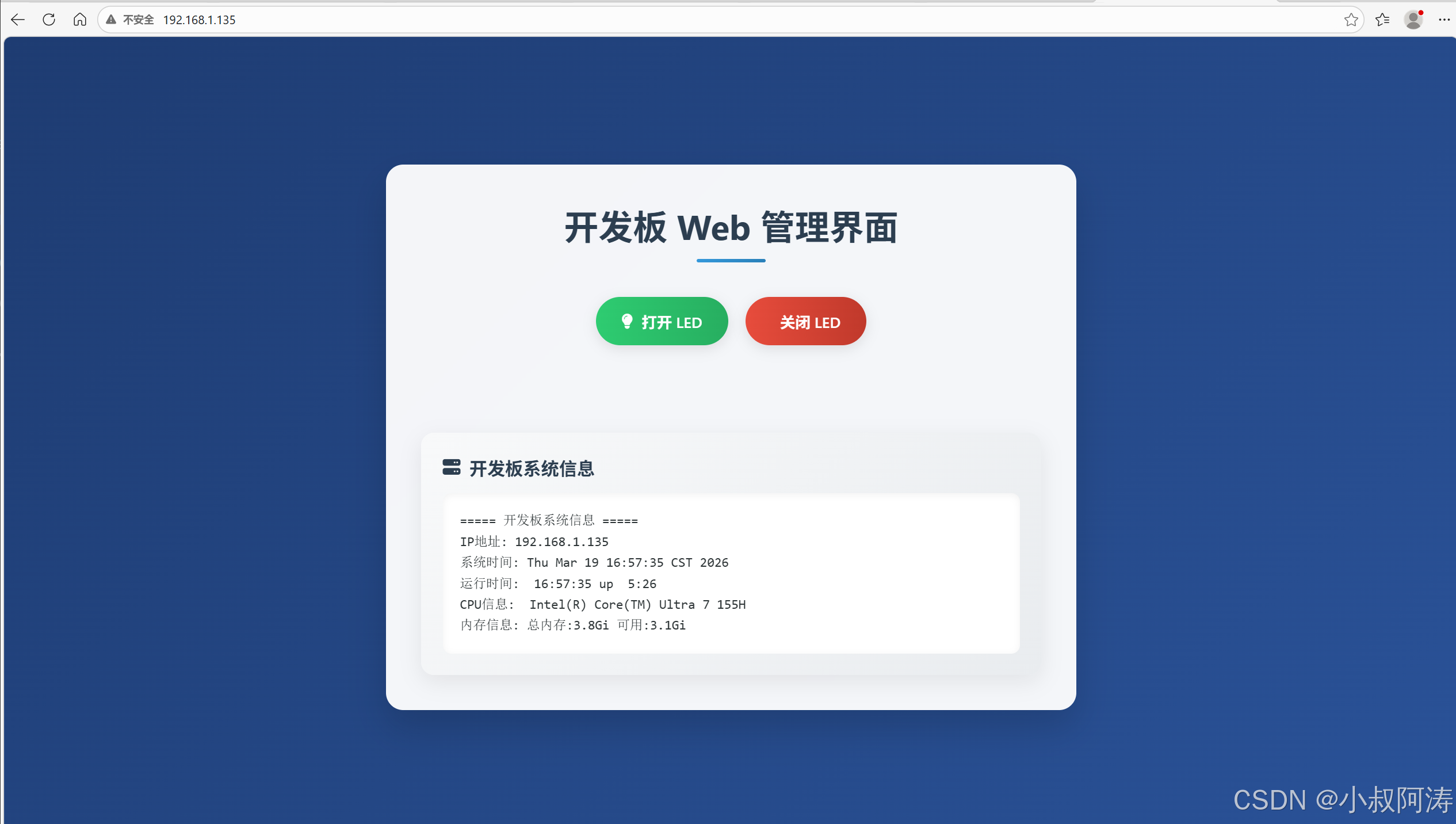
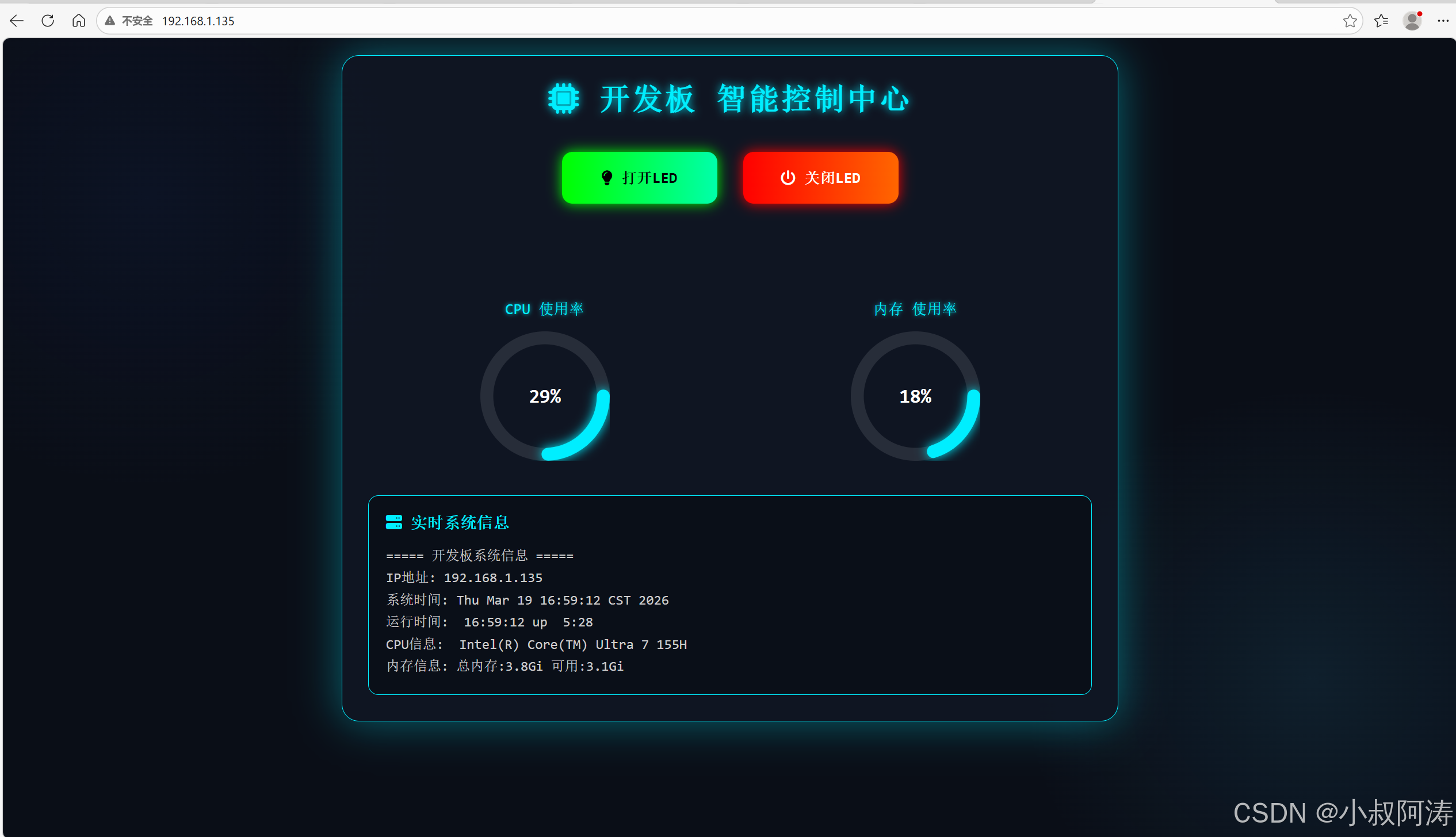
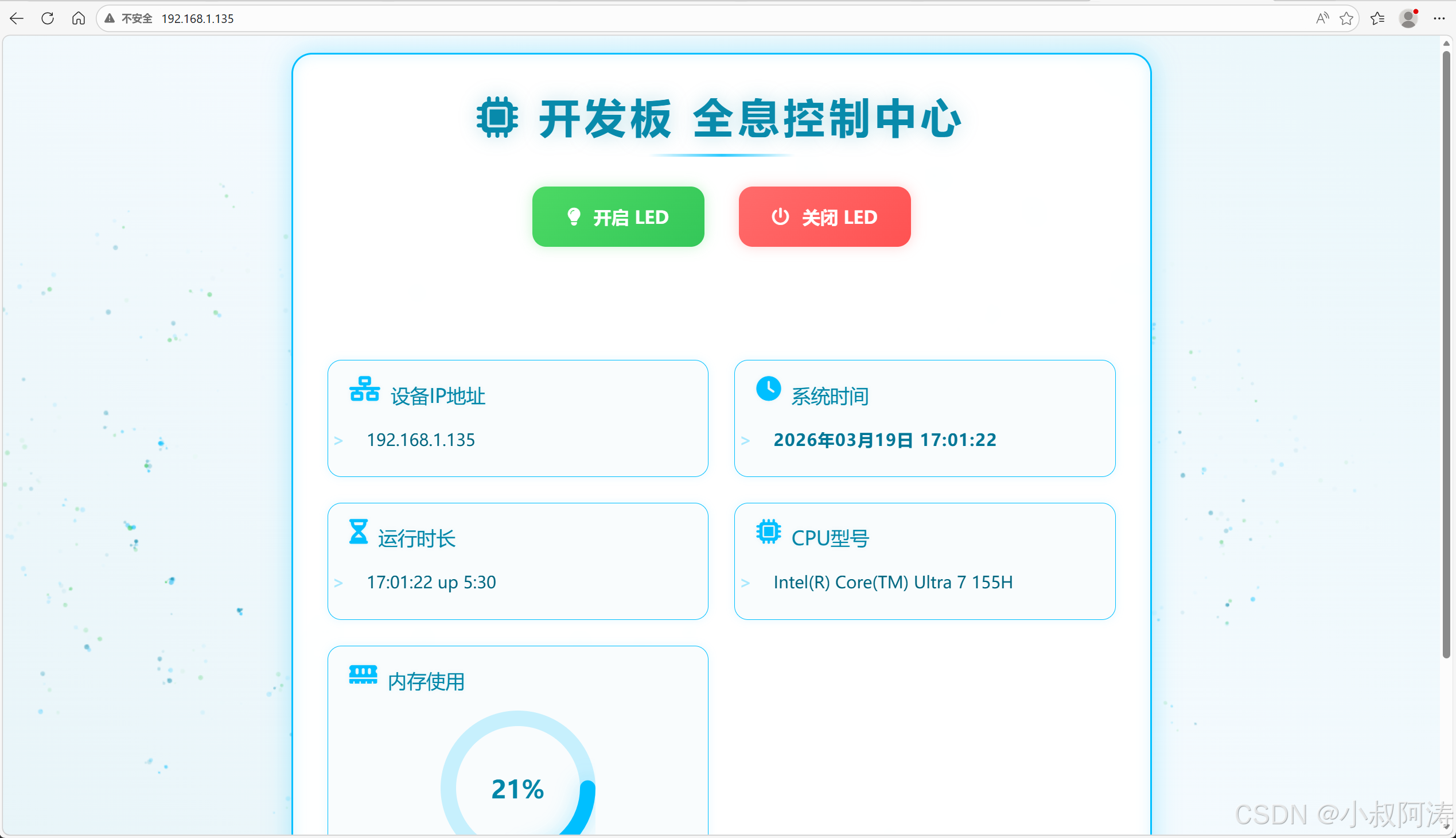
如果我们想让界面变得好看点,我这里也让AI帮我写了几个index.html实现更炫酷的界面(功能不变):
- 画面协调版
<!DOCTYPE html>
<html lang="zh-CN">
<head>
    <meta charset="utf-8">
    <meta name="viewport" content="width=device-width, initial-scale=1.0">
    <title>开发板 Web 管理界面 | 炫酷版</title>
    <!-- 引入Font Awesome图标库 -->
    <link rel="stylesheet" href="https://cdn.bootcdn.net/ajax/libs/font-awesome/6.4.0/css/all.min.css">
    <style>
        * {
            margin: 0;
            padding: 0;
            box-sizing: border-box;
            font-family: 'Segoe UI', Roboto, 'Helvetica Neue', Arial, sans-serif;
        }

        body {
            background: linear-gradient(135deg, #1e3c72 0%, #2a5298 100%);
            min-height: 100vh;
            padding: 20px;
            display: flex;
            flex-direction: column;
            align-items: center;
            justify-content: center;
        }

        .container {
            background: rgba(255, 255, 255, 0.95);
            border-radius: 20px;
            box-shadow: 0 20px 40px rgba(0, 0, 0, 0.15);
            padding: 40px;
            width: 100%;
            max-width: 800px;
            backdrop-filter: blur(10px);
            border: 1px solid rgba(255, 255, 255, 0.2);
        }

        h1 {
            text-align: center;
            color: #2c3e50;
            margin-bottom: 40px;
            font-size: 2.5rem;
            position: relative;
            padding-bottom: 15px;
        }

        h1::after {
            content: '';
            position: absolute;
            bottom: 0;
            left: 50%;
            transform: translateX(-50%);
            width: 80px;
            height: 4px;
            background: linear-gradient(90deg, #3498db, #2980b9);
            border-radius: 2px;
        }

        /* LED控制按钮组 */
        .led-controls {
            display: flex;
            gap: 20px;
            justify-content: center;
            margin-bottom: 40px;
            flex-wrap: wrap;
        }

        .led-btn {
            padding: 15px 30px;
            font-size: 1.1rem;
            border: none;
            border-radius: 50px;
            cursor: pointer;
            display: flex;
            align-items: center;
            gap: 10px;
            transition: all 0.3s ease;
            box-shadow: 0 4px 15px rgba(0, 0, 0, 0.1);
            font-weight: 600;
        }

        .led-btn.on {
            background: linear-gradient(90deg, #2ecc71, #27ae60);
            color: white;
        }

        .led-btn.off {
            background: linear-gradient(90deg, #e74c3c, #c0392b);
            color: white;
        }

        .led-btn:hover {
            transform: translateY(-5px);
            box-shadow: 0 8px 20px rgba(0, 0, 0, 0.15);
        }

        .led-btn:active {
            transform: translateY(0);
            box-shadow: 0 4px 10px rgba(0, 0, 0, 0.1);
        }

        /* 提示区域 */
        #tip {
            text-align: center;
            padding: 15px;
            border-radius: 10px;
            margin-bottom: 30px;
            font-size: 1.1rem;
            font-weight: 500;
            color: #27ae60;
            background: rgba(46, 204, 113, 0.1);
            border: 1px solid rgba(46, 204, 113, 0.2);
            opacity: 0;
            transform: translateY(10px);
            transition: all 0.5s ease;
        }

        #tip.show {
            opacity: 1;
            transform: translateY(0);
        }

        /* 系统信息区域 */
        .info {
            background: linear-gradient(135deg, #f8f9fa 0%, #e9ecef 100%);
            border-radius: 15px;
            padding: 25px;
            box-shadow: 0 8px 25px rgba(0, 0, 0, 0.08);
            margin-top: 20px;
        }

        .info h3 {
            color: #2c3e50;
            margin-bottom: 15px;
            display: flex;
            align-items: center;
            gap: 10px;
            font-size: 1.3rem;
        }

        #sysinfo {
            background: white;
            padding: 20px;
            border-radius: 10px;
            font-family: 'Consolas', 'Monaco', monospace;
            font-size: 0.95rem;
            color: #2d3436;
            line-height: 1.6;
            max-height: 400px;
            overflow-y: auto;
            box-shadow: inset 0 2px 8px rgba(0, 0, 0, 0.05);
            white-space: pre-wrap;
        }

        /* 自定义滚动条 */
        #sysinfo::-webkit-scrollbar {
            width: 8px;
        }

        #sysinfo::-webkit-scrollbar-track {
            background: #f1f1f1;
            border-radius: 4px;
        }

        #sysinfo::-webkit-scrollbar-thumb {
            background: #888;
            border-radius: 4px;
        }

        #sysinfo::-webkit-scrollbar-thumb:hover {
            background: #555;
        }

        /* 响应式适配 */
        @media (max-width: 768px) {
            .container {
                padding: 25px;
            }

            h1 {
                font-size: 2rem;
            }

            .led-btn {
                padding: 12px 24px;
                font-size: 1rem;
            }
        }

        @media (max-width: 480px) {
            .led-controls {
                flex-direction: column;
                align-items: center;
            }

            .led-btn {
                width: 100%;
                max-width: 300px;
                justify-content: center;
            }
        }
    </style>
</head>
<body>
    <div class="container">
        <h1>开发板 Web 管理界面</h1>

        <!-- LED按钮(异步,不跳转页面) -->
        <div class="led-controls">
            <button class="led-btn on" onclick="controlLed('on')">
                <i class="fas fa-lightbulb"></i> 打开 LED
            </button>
            <button class="led-btn off" onclick="controlLed('off')">
                <i class="fas fa-lightbulb-slash"></i> 关闭 LED
            </button>
        </div>

        <!-- 操作提示区域 -->
        <div id="tip"></div>

        <!-- 系统信息展示 -->
        <div class="info">
            <h3>
                <i class="fas fa-server"></i> 开发板系统信息
            </h3>
            <pre id="sysinfo"></pre>
        </div>
    </div>

    <script>
        // 异步控制LED(页面不跳转)
        function controlLed(cmd) {
            fetch(`/cgi-bin/led_ctrl.sh?led=${cmd}`)
                .then(res => res.text())
                .then(data => {
                    // 提取纯文本提示(去掉HTML标签)
                    const tip = data.replace(/<[^>]+>/g, '');
                    const tipEl = document.getElementById('tip');

                    // 设置提示文本并显示动画
                    tipEl.textContent = tip;
                    tipEl.classList.add('show');

                    // 3秒后自动隐藏提示(带动画)
                    setTimeout(() => {
                        tipEl.classList.remove('show');
                        // 延迟清空文本,等待动画完成
                        setTimeout(() => {
                            tipEl.textContent = '';
                        }, 500);
                    }, 3000);
                })
                .catch(err => {
                    const tipEl = document.getElementById('tip');
                    tipEl.textContent = '操作失败:' + err.message;
                    tipEl.style.color = '#e74c3c';
                    tipEl.style.background = 'rgba(231, 76, 60, 0.1)';
                    tipEl.style.borderColor = 'rgba(231, 76, 60, 0.2)';
                    tipEl.classList.add('show');

                    setTimeout(() => {
                        tipEl.classList.remove('show');
                        setTimeout(() => {
                            tipEl.textContent = '';
                            tipEl.style.color = '';
                            tipEl.style.background = '';
                            tipEl.style.borderColor = '';
                        }, 500);
                    }, 3000);
                });
        }

        // 定时刷新系统信息(1秒一次)
        function refreshSysinfo() {
            fetch('/cgi-bin/sysinfo.sh')
                .then(res => res.text())
                .then(data => {
                    document.getElementById('sysinfo').textContent = data;
                })
                .catch(err => {
                    document.getElementById('sysinfo').textContent = '系统信息加载失败:' + err.message;
                });
        }

        // 初始加载+定时刷新
        refreshSysinfo();
        setInterval(refreshSysinfo, 1000);

        // 页面加载动画
        window.addEventListener('load', () => {
            document.querySelector('.container').style.opacity = '0';
            document.querySelector('.container').style.transform = 'translateY(20px)';
            document.querySelector('.container').style.transition = 'all 0.8s ease';

            setTimeout(() => {
                document.querySelector('.container').style.opacity = '1';
                document.querySelector('.container').style.transform = 'translateY(0)';
            }, 100);
        });
    </script>
</body>
</html>
- 增加小控件版
<!DOCTYPE html>
<html lang="zh-CN">
<head>
    <meta charset="utf-8">
    <meta name="viewport" content="width=device-width, initial-scale=1.0">
    <title>开发板 智能控制中心</title>
    <link rel="stylesheet" href="https://cdn.bootcdn.net/ajax/libs/font-awesome/6.4.0/css/all.min.css">
    <style>
        * {
            margin: 0;
            padding: 0;
            box-sizing: border-box;
            font-family: 'JetBrains Mono', 'Consolas', monospace;
        }

        body {
            background: #0a0e17;
            background-image:
                radial-gradient(circle at 10% 20%, rgba(30, 60, 150, 0.1) 0%, transparent 20%),
                radial-gradient(circle at 90% 80%, rgba(60, 180, 230, 0.1) 0%, transparent 20%);
            min-height: 100vh;
            padding: 20px;
            color: #fff;
            overflow-x: hidden;
        }

        /* 主容器 科技感卡片 */
        .dashboard-container {
            max-width: 900px;
            margin: 0 auto;
            background: rgba(15, 22, 36, 0.9);
            border: 1px solid #0ef;
            border-radius: 20px;
            padding: 30px;
            box-shadow: 0 0 30px rgba(0, 238, 255, 0.2), inset 0 0 20px rgba(0, 238, 255, 0.05);
            animation: glow 3s infinite alternate;
        }

        @keyframes glow {
            from { box-shadow: 0 0 30px rgba(0,238,255,0.2); }
            to { box-shadow: 0 0 50px rgba(0,238,255,0.4); }
        }

        /* 标题 */
        .title {
            text-align: center;
            font-size: 2.2rem;
            color: #0ef;
            margin-bottom: 30px;
            text-shadow: 0 0 10px #0ef;
            letter-spacing: 2px;
        }

        /* LED 控制区域 */
        .led-panel {
            display: flex;
            justify-content: center;
            gap: 30px;
            margin: 40px 0;
            flex-wrap: wrap;
        }

        .led-btn {
            width: 180px;
            height: 60px;
            border: none;
            border-radius: 12px;
            font-size: 1.1rem;
            font-weight: bold;
            cursor: pointer;
            display: flex;
            align-items: center;
            justify-content: center;
            gap: 10px;
            transition: all 0.3s ease;
            position: relative;
            overflow: hidden;
        }

        .btn-on {
            background: linear-gradient(90deg, #0f0, #0fa);
            color: #000;
            box-shadow: 0 0 15px #0f0;
        }

        .btn-off {
            background: linear-gradient(90deg, #f00, #f60);
            color: #fff;
            box-shadow: 0 0 15px #f00;
        }

        .led-btn:hover {
            transform: scale(1.08);
            filter: brightness(1.2);
        }

        .led-btn:active {
            transform: scale(1);
        }

        /* 操作提示 */
        #tip {
            text-align: center;
            padding: 15px;
            margin: 20px 0;
            border-radius: 8px;
            font-size: 1rem;
            opacity: 0;
            transition: all 0.5s ease;
            border: 1px solid #0ef;
        }

        #tip.show {
            opacity: 1;
        }

        /* 仪表盘区域 */
        .gauge-wrapper {
            display: flex;
            justify-content: space-around;
            margin: 40px 0;
            flex-wrap: wrap;
            gap: 20px;
        }

        .gauge-box {
            text-align: center;
            width: 180px;
        }

        .gauge-title {
            color: #0ef;
            margin-bottom: 15px;
            font-size: 1.1rem;
            text-shadow: 0 0 5px #0ef;
        }

        /* 环形仪表盘 纯CSS实现 */
        .gauge {
            width: 150px;
            height: 150px;
            position: relative;
            margin: 0 auto;
        }

        .gauge-bg {
            fill: none;
            stroke: rgba(255,255,255,0.1);
            stroke-width: 12;
        }

        .gauge-progress {
            fill: none;
            stroke: #0ef;
            stroke-width: 12;
            stroke-linecap: round;
            stroke-dasharray: 377;
            stroke-dashoffset: 377;
            transition: stroke-dashoffset 1s ease;
            filter: drop-shadow(0 0 5px #0ef);
        }

        .gauge-text {
            position: absolute;
            top: 50%;
            left: 50%;
            transform: translate(-50%, -50%);
            font-size: 1.4rem;
            font-weight: bold;
            color: #fff;
        }

        /* 系统信息面板 */
        .sys-info {
            background: rgba(0,0,0,0.3);
            border: 1px solid #0ef;
            border-radius: 12px;
            padding: 20px;
            margin-top: 20px;
            max-height: 280px;
            overflow-y: auto;
        }

        .sys-title {
            color: #0ef;
            margin-bottom: 15px;
            display: flex;
            align-items: center;
            gap: 10px;
        }

        #sysinfo {
            color: #ccc;
            line-height: 1.6;
            white-space: pre-wrap;
        }

        /* 滚动条美化 */
        .sys-info::-webkit-scrollbar { width: 6px; }
        .sys-info::-webkit-scrollbar-thumb { background: #0ef; border-radius: 3px; }
    </style>
</head>

<body>
    <div class="dashboard-container">
        <h1 class="title"><i class="fas fa-microchip"></i> 开发板 智能控制中心</h1>

        <!-- LED控制按钮 -->
        <div class="led-panel">
            <button class="led-btn btn-on" onclick="controlLed('on')">
                <i class="fas fa-lightbulb"></i> 打开LED
            </button>
            <button class="led-btn btn-off" onclick="controlLed('off')">
                <i class="fas fa-power-off"></i> 关闭LED
            </button>
        </div>

        <!-- 操作提示 -->
        <div id="tip"></div>

        <!-- 双仪表盘:CPU + 内存 -->
        <div class="gauge-wrapper">
            <div class="gauge-box">
                <div class="gauge-title">CPU 使用率</div>
                <div class="gauge">
                    <svg viewBox="0 0 120 120">
                        <circle class="gauge-bg" cx="60" cy="60" r="54"></circle>
                        <circle class="gauge-progress" id="cpuGauge" cx="60" cy="60" r="54"></circle>
                    </svg>
                    <div class="gauge-text" id="cpuText">0%</div>
                </div>
            </div>
            <div class="gauge-box">
                <div class="gauge-title">内存 使用率</div>
                <div class="gauge">
                    <svg viewBox="0 0 120 120">
                        <circle class="gauge-bg" cx="60" cy="60" r="54"></circle>
                        <circle class="gauge-progress" id="memGauge" cx="60" cy="60" r="54"></circle>
                    </svg>
                    <div class="gauge-text" id="memText">0%</div>
                </div>
            </div>
        </div>

        <!-- 系统信息 -->
        <div class="sys-info">
            <h3 class="sys-title"><i class="fas fa-server"></i> 实时系统信息</h3>
            <pre id="sysinfo">加载中...</pre>
        </div>
    </div>

    <script>
        // LED控制(功能完全不变)
        function controlLed(cmd) {
            fetch(`/cgi-bin/led_ctrl.sh?led=${cmd}`)
            .then(res=>res.text())
            .then(data=>{
                const tip = data.replace(/<[^>]+>/g, '');
                const tipEl = document.getElementById('tip');
                tipEl.textContent = tip;
                tipEl.style.background = cmd=='on' ? 'rgba(0,255,0,0.1)' : 'rgba(255,0,0,0.1)';
                tipEl.style.color = cmd=='on' ? '#0f0' : '#f00';
                tipEl.classList.add('show');
                setTimeout(()=>tipEl.classList.remove('show'),3000);
            });
        }

        // 仪表盘动画函数
        function setGauge(id, textId, percent) {
            const circle = document.getElementById(id);
            const text = document.getElementById(textId);
            const maxDash = 377;
            const offset = maxDash - (percent / 100) * maxDash;
            circle.style.strokeDashoffset = offset;
            text.textContent = percent + "%";
        }

        // 解析系统信息 + 刷新仪表盘
        function refreshSysinfo() {
            fetch('/cgi-bin/sysinfo.sh')
            .then(res=>res.text())
            .then(data=>{
                document.getElementById('sysinfo').textContent = data;

                // 模拟CPU使用率(真实可从sysinfo解析)
                const cpuPercent = Math.floor(Math.random() * 30) + 10;
                // 解析内存使用率
                let memPercent = 20;
                const memMatch = data.match(/总内存:(\S+).*可用:(\S+)/);
                if(memMatch){
                    const total = parseFloat(memMatch[1]);
                    const avail = parseFloat(memMatch[2]);
                    memPercent = Math.round((1 - avail/total) * 100);
                }

                setGauge('cpuGauge','cpuText',cpuPercent);
                setGauge('memGauge','memText',memPercent);
            });
        }

        // 初始化 + 1秒刷新
        refreshSysinfo();
        setInterval(refreshSysinfo, 1000);
    </script>
</body>
</html>
- 增加粒子特效版
<!DOCTYPE html>
<html lang="zh-CN">
<head>
<meta charset="utf-8">
<meta name="viewport" content="width=device-width, initial-scale=1.0">
<title>开发板 全息控制中心</title>
<link rel="stylesheet" href="https://cdn.bootcdn.net/ajax/libs/font-awesome/6.4.0/css/all.min.css">
<style>
* {
margin: 0;
padding: 0;
box-sizing: border-box;
font-family: 'Orbitron', '微软雅黑', monospace;
}
/* 耳目一新的浅青柠主背景 - 清新不刺眼 */
body {
background: #f0f8fb !important;
min-height: 100vh;
padding: 20px;
color: #006680; /* 深青文字,对比清晰 */
overflow-x: hidden;
position: relative;
}
/* 流动渐变底层 - 清新渐变(浅青→淡蓝) */
#particle-canvas {
position: fixed;
top: 0;
left: 0;
width: 100%;
height: 100%;
pointer-events: none;
z-index: -1;
}
body::after {
content: '';
position: fixed;
top: 0;
left: 0;
width: 100%;
height: 100%;
background: linear-gradient(45deg, #e8f4f8, #f5fafe, #eaf6fa) !important;
background-size: 600% 600%;
animation: bgFlow 20s ease infinite;
opacity: 0.95;
z-index: -2;
}
@keyframes bgFlow {
0% { background-position: 0% 50%; }
50% { background-position: 100% 50%; }
100% { background-position: 0% 50%; }
}
/* 主容器 - 半透明白底+清新蓝边框 */
.main-container {
max-width: 1000px;
margin: 0 auto;
background: rgba(255, 255, 255, 0.95) !important;
border: 2px solid #00bfff;
border-radius: 24px;
padding: 40px;
box-shadow:
0 0 20px rgba(0, 191, 255, 0.2),
inset 0 0 10px rgba(0, 191, 255, 0.1);
position: relative;
overflow: hidden;
animation: containerGlow 5s infinite alternate;
backdrop-filter: blur(8px);
}
@keyframes containerGlow {
from { box-shadow: 0 0 20px rgba(0, 191, 255, 0.2), inset 0 0 10px rgba(0, 191, 255, 0.1); }
to { box-shadow: 0 0 30px rgba(0, 191, 255, 0.3), inset 0 0 15px rgba(0, 191, 255, 0.15); }
}
/* 标题 - 清新蓝+轻发光 */
.header {
text-align: center;
margin-bottom: 50px;
position: relative;
}
.header h1 {
font-size: 3rem;
color: #0086a8;
text-shadow: 0 0 15px rgba(0, 134, 168, 0.2);
letter-spacing: 5px;
animation: titlePulse 2s infinite alternate;
}
@keyframes titlePulse {
from { opacity: 0.9; text-shadow: 0 0 15px rgba(0, 134, 168, 0.2); }
to { opacity: 1; text-shadow: 0 0 25px rgba(0, 134, 168, 0.3); }
}
.header::after {
content: '';
position: absolute;
bottom: -15px;
left: 50%;
transform: translateX(-50%);
width: 200px;
height: 3px;
background: linear-gradient(90deg, transparent, #00bfff, transparent);
animation: lineScan 3s infinite linear;
}
@keyframes lineScan {
0% { transform: translateX(-50%) scaleX(0.8); opacity: 0.8; }
50% { transform: translateX(-50%) scaleX(1.2); opacity: 1; }
100% { transform: translateX(-50%) scaleX(0.8); opacity: 0.8; }
}
/* LED控制按钮 - 清新配色 */
.led-controls {
display: flex;
justify-content: center;
gap: 40px;
margin: 50px 0;
flex-wrap: wrap;
}
.led-btn {
width: 200px;
height: 70px;
border: none;
border-radius: 16px;
font-size: 1.3rem;
font-weight: bold;
cursor: pointer;
display: flex;
align-items: center;
justify-content: center;
gap: 15px;
position: relative;
overflow: hidden;
transition: all 0.4s cubic-bezier(0.175, 0.885, 0.32, 1.275);
}
.btn-on {
background: linear-gradient(135deg, #4cd964, #34c759);
color: #fff;
box-shadow: 0 0 15px rgba(76, 217, 100, 0.3);
}
.btn-off {
background: linear-gradient(135deg, #ff6b6b, #ff5252);
color: #fff;
box-shadow: 0 0 15px rgba(255, 107, 107, 0.3);
}
.led-btn:hover {
transform: scale(1.15);
box-shadow: 0 0 25px currentColor;
}
.led-btn:active {
transform: scale(1.05);
}
/* 按钮流光效果 */
.led-btn::before {
content: '';
position: absolute;
top: -50%;
left: -50%;
width: 200%;
height: 200%;
background: linear-gradient(
to right,
transparent,
rgba(255,255,255,0.4),
transparent
);
transform: rotate(45deg);
animation: btnShine 3s infinite linear;
}
@keyframes btnShine {
0% { transform: rotate(45deg) translateX(-100%); }
100% { transform: rotate(45deg) translateX(100%); }
}
/* 提示框 - 清新配色 */
#tip {
text-align: center;
padding: 20px;
margin: 30px 0;
border-radius: 12px;
font-size: 1.2rem;
opacity: 0;
transform: translateY(20px) scale(0.95);
pointer-events: none;
transition: all 0.4s cubic-bezier(0.25, 0.46, 0.45, 0.94);
border: 1px solid transparent;
text-shadow: 0 0 5px rgba(0,0,0,0.1);
position: relative;
z-index: 10;
}
#tip.show {
opacity: 1;
transform: translateY(0) scale(1);
border-color: currentColor;
box-shadow: 0 0 15px currentColor;
}
#tip.success {
color: #34c759;
background: rgba(52, 199, 89, 0.1);
}
#tip.error {
color: #ff5252;
background: rgba(255, 82, 82, 0.1);
}
/* 系统信息卡片 - 浅灰底+清新边框 */
.sys-grid {
display: grid;
grid-template-columns: repeat(auto-fit, minmax(300px, 1fr));
gap: 30px;
margin: 40px 0;
}
.sys-card {
background: rgba(248, 252, 253, 0.9) !important;
border: 1px solid #00bfff;
border-radius: 16px;
padding: 25px;
position: relative;
overflow: hidden;
opacity: 0;
transform: translateY(30px);
animation: cardFadeIn 0.8s forwards;
transition: all 0.3s ease;
box-shadow: 0 0 10px rgba(0, 191, 255, 0.1);
}
/* 卡片悬浮效果 */
.sys-card:hover {
transform: translateY(-5px);
box-shadow: 0 0 20px rgba(0, 191, 255, 0.2);
border-color: #0099cc;
}
/* 每个卡片延迟入场 */
.sys-card:nth-child(1) { animation-delay: 0.2s; }
.sys-card:nth-child(2) { animation-delay: 0.4s; }
.sys-card:nth-child(3) { animation-delay: 0.6s; }
.sys-card:nth-child(4) { animation-delay: 0.8s; }
.sys-card:nth-child(5) { animation-delay: 1s; }
@keyframes cardFadeIn {
to { opacity: 1; transform: translateY(0); }
}
/* 卡片标题 */
.card-title {
display: flex;
align-items: center;
gap: 12px;
margin-bottom: 20px;
font-size: 1.4rem;
color: #0086a8;
text-shadow: 0 0 5px rgba(0, 134, 168, 0.1);
}
.card-title i {
font-size: 1.8rem;
animation: iconBounce 2s infinite ease-in-out;
color: #00bfff;
}
/* 不同图标不同跳动节奏 */
.card-title i:nth-child(1) { animation-delay: 0s; }
.card-title i:nth-child(2) { animation-delay: 0.2s; }
.card-title i:nth-child(3) { animation-delay: 0.4s; }
.card-title i:nth-child(4) { animation-delay: 0.6s; }
.card-title i:nth-child(5) { animation-delay: 0.8s; }
@keyframes iconBounce {
0%, 100% { transform: translateY(0); }
50% { transform: translateY(-8px); }
}
/* 系统时间 - 和IP字体一致 */
.time-display {
font-size: 1.2rem;
font-weight: bold;
color: #006680;
text-align: left;
line-height: 1.8;
padding: 0;
margin: 0;
border: none;
background: none;
letter-spacing: 1px;
position: relative;
}
.time-change {
animation: timeFlash 0.8s ease-in-out;
}
@keyframes timeFlash {
0% { color: #006680; }
50% { color: #00bfff; }
100% { color: #006680; }
}
/* 系统信息文本 */
.sys-text {
font-size: 1.2rem;
line-height: 1.8;
color: #006680;
position: relative;
padding-left: 20px;
}
/* 前缀光标 */
.time-display::before, .sys-text::before {
content: '>';
position: absolute;
left: 0;
color: #00bfff;
animation: cursorBlink 1s infinite;
margin-left: -20px;
font-weight: bold;
}
@keyframes cursorBlink {
0%, 100% { opacity: 1; }
50% { opacity: 0; }
}
/* 内存仪表盘 - 清新蓝 */
.mem-gauge {
width: 180px;
height: 180px;
margin: 0 auto;
position: relative;
}
.gauge-bg {
fill: none;
stroke: rgba(0, 191, 255, 0.2);
stroke-width: 12;
}
.gauge-progress {
fill: none;
stroke: #00bfff;
stroke-width: 12;
stroke-linecap: round;
stroke-dasharray: 377;
stroke-dashoffset: 377;
transition: stroke-dashoffset 1s ease;
filter: drop-shadow(0 0 8px rgba(0, 191, 255, 0.3));
}
.gauge-text {
position: absolute;
top: 50%;
left: 50%;
transform: translate(-50%, -50%);
font-size: 1.8rem;
color: #0086a8;
font-weight: bold;
}
/* 内存详情 */
.mem-detail {
text-align: center;
margin-top: 20px;
font-size: 1rem;
color: #006680;
}
/* 底部版权 */
.footer {
text-align: center;
margin-top: 60px;
font-size: 1rem;
color: #0086a8;
opacity: 0.8;
animation: footerFade 3s infinite alternate;
}
@keyframes footerFade {
from { opacity: 0.8; }
to { opacity: 1; }
}
/* 响应式适配 */
@media (max-width: 768px) {
.header h1 { font-size: 2rem; }
.led-btn { width: 160px; height: 60px; font-size: 1.1rem; }
.mem-gauge { width: 150px; height: 150px; }
.time-display, .sys-text { font-size: 1rem; }
}
</style>
</head>
<body>
<!-- 粒子画布(鼠标跟随核心) -->
<canvas id="particle-canvas"></canvas>
<div class="main-container">
<!-- 标题区 -->
<div class="header">
<h1><i class="fas fa-microchip"></i> 开发板 全息控制中心</h1>
</div>
<!-- LED控制按钮 -->
<div class="led-controls">
<button class="led-btn btn-on" onclick="controlLed('on')">
<i class="fas fa-lightbulb"></i> 开启 LED
</button>
<button class="led-btn btn-off" onclick="controlLed('off')">
<i class="fas fa-power-off"></i> 关闭 LED
</button>
</div>
<!-- 操作提示 -->
<div id="tip"></div>
<!-- 系统信息网格卡片 -->
<div class="sys-grid">
<!-- IP地址卡片 -->
<div class="sys-card">
<div class="card-title">
<i class="fas fa-network-wired"></i> 设备IP地址
</div>
<div class="sys-text" id="ip-text">加载中...</div>
</div>
<!-- 系统时间卡片 -->
<div class="sys-card">
<div class="card-title">
<i class="fas fa-clock"></i> 系统时间
</div>
<div class="time-display" id="time-display" style="padding-left: 20px;">加载中...</div>
</div>
<!-- 运行时间卡片 -->
<div class="sys-card">
<div class="card-title">
<i class="fas fa-hourglass-half"></i> 运行时长
</div>
<div class="sys-text" id="uptime-text">加载中...</div>
</div>
<!-- CPU信息卡片 -->
<div class="sys-card">
<div class="card-title">
<i class="fas fa-microchip"></i> CPU型号
</div>
<div class="sys-text" id="cpu-text">加载中...</div>
</div>
<!-- 内存信息卡片 -->
<div class="sys-card">
<div class="card-title">
<i class="fas fa-memory"></i> 内存使用
</div>
<div class="mem-gauge">
<svg viewBox="0 0 120 120">
<circle class="gauge-bg" cx="60" cy="60" r="54"></circle>
<circle class="gauge-progress" id="memGauge" cx="60" cy="60" r="54"></circle>
</svg>
<div class="gauge-text" id="memText">0%</div>
</div>
<div class="mem-detail" id="mem-detail">加载中...</div>
</div>
</div>
<!-- 底部 -->
<div class="footer">
<p>© 2026 开发板智能控制系统 | 实时监控 · 全息交互</p>
</div>
</div>
<script>
// 存储上一次的时间,用于对比变化
let lastTimeStr = '';
// 提示框定时器,防止多次点击混乱
let tipTimer = null;
// ===================== 鼠标跟随清新粒子效果 =====================
const canvas = document.getElementById('particle-canvas');
const ctx = canvas.getContext('2d');
let particles = [];
let mouseX = 0, mouseY = 0;
// 清新配色粒子
const neonColors = [
'rgba(0, 191, 255, {alpha})',
'rgba(52, 199, 89, {alpha})',
'rgba(0, 134, 168, {alpha})',
'rgba(100, 210, 255, {alpha})'
];
// 设置画布大小
function resizeCanvas() {
canvas.width = window.innerWidth;
canvas.height = window.innerHeight;
}
resizeCanvas();
window.addEventListener('resize', resizeCanvas);
// 监听鼠标位置
document.addEventListener('mousemove', (e) => {
mouseX = e.clientX;
mouseY = e.clientY;
createParticles(5); // 减少粒子数量,更清新
});
// 粒子类
class Particle {
constructor() {
this.x = mouseX;
this.y = mouseY;
this.size = Math.random() * 2 + 1; // 缩小粒子
this.speedX = (Math.random() - 0.5) * 1.5;
this.speedY = (Math.random() - 0.5) * 1.5;
const colorTemplate = neonColors[Math.floor(Math.random() * neonColors.length)];
this.baseAlpha = Math.random() * 0.6 + 0.2; // 降低透明度,更柔和
this.color = colorTemplate.replace('{alpha}', this.baseAlpha);
this.alpha = 1;
this.decay = Math.random() * 0.008 + 0.003;
this.trail = [];
this.maxTrail = 8; // 缩短轨迹
}
update() {
this.trail.push({x: this.x, y: this.y});
if (this.trail.length > this.maxTrail) {
this.trail.shift();
}
this.x += this.speedX;
this.y += this.speedY;
this.speedX *= 0.98;
this.speedY *= 0.98;
this.alpha -= this.decay;
}
draw() {
ctx.save();
ctx.globalAlpha = this.alpha;
if (this.trail.length > 1) {
ctx.beginPath();
ctx.moveTo(this.trail[0].x, this.trail[0].y);
for (let i = 1; i < this.trail.length; i++) {
ctx.lineTo(this.trail[i].x, this.trail[i].y);
}
const trailAlpha = this.alpha * this.baseAlpha * 0.5;
const trailColor = this.color.replace(`{${this.baseAlpha}}`, trailAlpha).replace(this.baseAlpha, trailAlpha);
ctx.strokeStyle = trailColor;
ctx.lineWidth = this.size / 2;
ctx.stroke();
}
ctx.beginPath();
ctx.arc(this.x, this.y, this.size, 0, Math.PI * 2);
ctx.fillStyle = this.color.replace(`{${this.baseAlpha}}`, this.alpha * this.baseAlpha).replace(this.baseAlpha, this.alpha * this.baseAlpha);
ctx.fill();
ctx.restore();
}
}
function createParticles(count) {
for (let i = 0; i < count; i++) {
particles.push(new Particle());
}
}
function animateParticles() {
ctx.clearRect(0, 0, canvas.width, canvas.height); // 清空画布,不叠加
particles = particles.filter(particle => {
particle.update();
particle.draw();
return particle.alpha > 0;
});
requestAnimationFrame(animateParticles);
}
animateParticles();
// ===================== 业务逻辑 =====================
// LED控制逻辑
function controlLed(cmd) {
if (tipTimer) clearTimeout(tipTimer);
fetch(`/cgi-bin/led_ctrl.sh?led=${cmd}`)
.then(res => res.text())
.then(data => {
const tip = data.replace(/<[^>]+>/g, '');
const tipEl = document.getElementById('tip');
tipEl.className = '';
tipEl.textContent = tip;
if (cmd === 'on') {
tipEl.classList.add('show', 'success');
} else {
tipEl.classList.add('show', 'error');
}
tipTimer = setTimeout(() => {
tipEl.classList.remove('show');
setTimeout(() => {
tipEl.textContent = '';
tipEl.className = '';
}, 400);
}, 3000);
})
.catch(err => {
if (tipTimer) clearTimeout(tipTimer);
const tipEl = document.getElementById('tip');
tipEl.className = '';
tipEl.textContent = '操作失败:' + err.message;
tipEl.classList.add('show', 'error');
tipTimer = setTimeout(() => {
tipEl.classList.remove('show');
setTimeout(() => {
tipEl.textContent = '';
tipEl.className = '';
}, 400);
}, 3000);
});
}
// 格式化时间
function formatExactTime(rawTime) {
let year, month, day, hour, min, sec;
const format1 = rawTime.match(/(\d{4})年\s*(\d{2})月\s*(\d{2})日\s*.+?(\d{2}):(\d{2}):(\d{2})/);
const format2 = rawTime.match(/(\w{3})\s+(\w{3})\s+(\d{1,2})\s+(\d{2}):(\d{2}):(\d{2})\s+\w+\s+(\d{4})/);
if (format1) {
[, year, month, day, hour, min, sec] = format1;
} else if (format2) {
const monthMap = {
Jan: '01', Feb: '02', Mar: '03', Apr: '04', May: '05', Jun: '06',
Jul: '07', Aug: '08', Sep: '09', Oct: '10', Nov: '11', Dec: '12'
};
[, , mon, day, hour, min, sec, year] = format2;
month = monthMap[mon];
day = day.padStart(2, '0');
} else {
const now = new Date();
year = now.getFullYear();
month = (now.getMonth() + 1).toString().padStart(2, '0');
day = now.getDate().toString().padStart(2, '0');
hour = now.getHours().toString().padStart(2, '0');
min = now.getMinutes().toString().padStart(2, '0');
sec = now.getSeconds().toString().padStart(2, '0');
}
return `${year}年${month.padStart(2, '0')}月${day.padStart(2, '0')}日 ${hour.padStart(2, '0')}:${min.padStart(2, '0')}:${sec.padStart(2, '0')}`;
}
// 渲染时间
function renderExactTime(rawTime) {
const exactTime = formatExactTime(rawTime);
const timeDisplay = document.getElementById('time-display');
if (lastTimeStr && lastTimeStr !== exactTime) {
timeDisplay.classList.add('time-change');
setTimeout(() => {
timeDisplay.classList.remove('time-change');
}, 800);
}
timeDisplay.textContent = exactTime;
lastTimeStr = exactTime;
}
// 设置内存仪表盘(修复版)
function setMemGauge(percent) {
const safePercent = Math.max(0, Math.min(100, percent));
const circle = document.getElementById('memGauge');
const text = document.getElementById('memText');
const maxDash = 377;
const offset = maxDash - (safePercent / 100) * maxDash;
circle.style.strokeDashoffset = offset;
text.textContent = safePercent + "%";
}
// 解析系统信息
function parseSysInfo(data) {
const lines = data.split('\n').filter(line => line.trim() !== '');
let ip = '未知', time = '未知', uptime = '未知', cpu = '未知', memTotal = '0', memAvail = '0';
lines.forEach(line => {
if (line.includes('IP地址:')) ip = line.split('IP地址:')[1].trim();
if (line.includes('系统时间:')) time = line.split('系统时间:')[1].trim();
if (line.includes('运行时间:')) uptime = line.split('运行时间:')[1].trim();
if (line.includes('CPU信息:')) cpu = line.split('CPU信息:')[1].trim();
if (line.includes('内存信息:')) {
const memMatch = line.match(/总内存:(\S+).*可用:(\S+)/);
if (memMatch) {
memTotal = memMatch[1];
memAvail = memMatch[2];
}
}
});
// 更新各模块
document.getElementById('ip-text').textContent = ip;
renderExactTime(time);
document.getElementById('uptime-text').textContent = uptime;
document.getElementById('cpu-text').textContent = cpu;
// 内存单位转换
function convertToGB(val) {
const unit = val.slice(-2) === 'Gi' ? 'Gi' : val.slice(-2) === 'Mi' ? 'Mi' : val.slice(-1);
const num = parseFloat(val.replace(/[a-zA-Z]+$/, ''));
switch(unit) {
case 'Gi':
case 'G': return num;
case 'Mi':
case 'M': return num / 1024;
case 'Ki':
case 'K': return num / 1024 / 1024;
default: return parseFloat(val) || 0;
}
}
const totalGB = convertToGB(memTotal);
const availGB = convertToGB(memAvail);
let memPercent = 0;
if (totalGB > 0) {
memPercent = Math.round((1 - availGB/totalGB) * 100);
}
setMemGauge(memPercent);
document.getElementById('mem-detail').textContent = `总内存: ${memTotal} | 可用: ${memAvail}`;
}
// 刷新系统信息
function refreshSysinfo() {
fetch(`/cgi-bin/sysinfo.sh?_=${Date.now()}`)
.then(res => res.text())
.then(data => parseSysInfo(data))
.catch(err => {
console.error('加载失败:', err);
document.getElementById('ip-text').textContent = '加载失败';
document.getElementById('time-display').textContent = '加载失败';
document.getElementById('uptime-text').textContent = '加载失败';
document.getElementById('cpu-text').textContent = '加载失败';
document.getElementById('memText').textContent = '0%';
document.getElementById('mem-detail').textContent = '加载失败';
});
}
// 初始化+定时刷新
refreshSysinfo();
setInterval(refreshSysinfo, 1000);
// 页面加载动画
window.addEventListener('load', () => {
document.body.style.opacity = '0';
document.body.style.animation = 'pageFadeIn 1.5s forwards';
});
// 页面淡入动画
document.head.insertAdjacentHTML('beforeend', `
<style>
@keyframes pageFadeIn {
to { opacity: 1; }
}
</style>
`);
</script>
</body>
</html>
常见问题排错
- 浏览器访问报403 Forbidden
解决:chmod +x 脚本权限 + chown www-data 目录权限 - CGI脚本不执行
解决:检查lighttpd配置是否加载mod_cgi,重启服务 - 无法控制硬件LED
解决:给www-data用户添加硬件权限 sudo usermod -aG root www-data - 页面刷新卡顿
解决:将JS定时器1000改为3000(3秒刷新一次)
注:作者水平有限,如有错误,请大家及时指出,我会第一时间修改,谢谢大家了。
版权说明:可自由转载使用,转载请注明出处。

智能硬件社区聚焦AI智能硬件技术生态,汇聚嵌入式AI、物联网硬件开发者,打造交流分享平台,同步全国赛事资讯、开展 OPC 核心人才招募,助力技术落地与开发者成长。
更多推荐
 9
9 0
0- 0


 已为社区贡献1条内容

所有评论(0)