【全志开发板部署】系列3:LPRNet模型转换及部署流程(全网最详细版)
本文介绍了LPRNet模型的快速部署流程,包括环境配置、模型转换和配置文件设置。首先需要从指定网址下载资源并配置Docker环境。模型结构包含预处理、后处理和主程序等组件。模型转换需在配置好的Python环境下将.pth模型转为onnx格式,并修改相关路径参数。配置文件中需根据代码设置mean值为127.5,scale值为0.0078125(1/128)。文章还提供了完整的config_yml.p
本文参考全志科技awnpu_model_zoo中LPRNet例程中的readme来编写,环境配置根据awnpu_model_zoo\docs中《NPU开发环境部署参考指南》的Docker镜像部分进行说明,本文为快速部署流程,如果想了解更详细流程,请参考awnpu_model_zoo\docs下的文档
本文中提到的资源下载链接:
下载相关包,Docker安装详细流程请参考:
https://blog.csdn.net/troyteng/article/details/155444386?spm=1011.2415.3001.5331
模型结构
完整的模型结构如下:
tree -L 2
.
├── CMakeLists.txt
├── convert_model
│   ├── config_yml.py
│   ├── convert_model_env.sh
│   └── python
├── LPRNet_post.cpp
├── LPRNet_pre.cpp
├── main.cpp
├── model
│   ├── demo1.jpg
│   └── LPRNet_uint8_mr536.nb
├── model_config.h
└── README.md
模型转换
将.pth模型转换为onnx可通过以下步骤
配置环境
在LPRNet模型推理环境搭建及推理流程中配置的python环境下,安装onnx相关库
pip install onnx
pip install onnxscript
修改脚本
模型转换脚本convert_pth2onnx.py位于LPRNet/convert_model/python中,修改脚本中的模型路径
if __name__ == "__main__":
    lpr_max_len = 8
    phase = False
    class_num = 68
    dropout_rate = 0.5
    model_path = 'Final_LPRNet_model.pth' # Your model weights file path
    temp_onnx_path = 'LPRNet_temp.onnx'
    temp_data_path = temp_onnx_path + '.data'
    output_onnx_path = '../LPRNet.onnx'
    opset_version = 18
运行脚本
python convert_pth2onnx.py
转换后文件结构如下
~/docker_data/awnpu_model_zoo/examples/LPRNet/convert_model$ tree
    .
    ├── config_yml.py
    ├── convert_model_env.sh
    ├── LPRNet.onnx
    └── python
        └── convert_pth2onnx.py
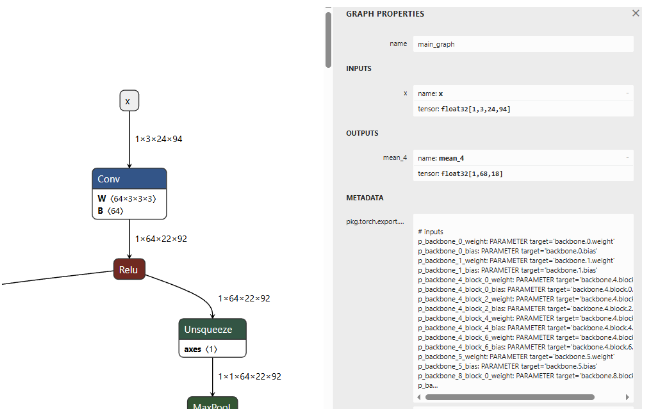
使用Netron工具,点击第一个节点images,如下图,其输入是静态的,无需固化操作。
配置文件
在模型github仓库中,load_data.py中提到:
def transform(self, img):
    img = img.astype('float32')
    img -= 127.5
    img *= 0.0078125
    img = np.transpose(img, (2, 0, 1))
    return img
这说明:
- mean值 :127.5(对所有通道应用相同的值)
- std值 :128(因为代码中使用了乘以0.0078125的操作,而0.0078125等于1/128)
- scale值 :0.0078125
所以,config_yml.py中,将MEAN和SCALE值分别修改为
# mean, scale
MEAN    = [127.5, 127.5, 127.5]
SCALE   = [0.0078125, 0.0078125, 0.0078125]
config_yml.py其它相关参数配置如下:
# "database"
DATASET = '../../dataset/coco_12/dataset.txt'
DATASET_TYPE = "TEXT"
# mean, scale
MEAN    = [127.5, 127.5, 127.5]
SCALE   = [0.0078125, 0.0078125, 0.0078125]

# reverse_channel: True bgr, False rgb
REVERSE_CHANNEL = True
# add_preproc_node, True or False
ADD_PREPROC_NODE = True
# "preproc_type"
PREPROC_TYPE = "IMAGE_RGB"
# add_postproc_node, quant output -> float32 output
ADD_POSTPROC_NODE = True
完整config_yml.py文件
#!/usr/bin/env python3
import os
import sys
from acuitylib.vsi_nn import VSInn
import numpy as np


# "database" allowed types: "TEXT, NPY, H5FS, SQLITE, LMDB, GENERATOR, ZIP"
DATASET = '../../dataset/license_plate_10/dataset.txt'
DATASET_TYPE = "TEXT"

# mean, scale
MEAN    = [127.5, 127.5, 127.5]
SCALE   = [0.0078125, 0.0078125, 0.0078125]

# reverse_channel: True bgr, False rgb
REVERSE_CHANNEL = False

# add_preproc_node, True or False
ADD_PREPROC_NODE = True
# "preproc_type" allowed types:"IMAGE_RGB, IMAGE_RGB888_PLANAR, IMAGE_RGB888_PLANAR_SEP, IMAGE_I420,
# IMAGE_NV12,IMAGE_NV21, IMAGE_YUV444, IMAGE_YUYV422, IMAGE_UYVY422, IMAGE_GRAY, IMAGE_BGRA, TENSOR"
PREPROC_TYPE = "IMAGE_RGB"

# add_postproc_node, quant output -> float32 output
ADD_POSTPROC_NODE = True


if __name__ == "__main__":

    nn = VSInn()
    net = nn.create_net()

    model_filename = sys.argv[1]
    model = model_filename + ".json"
    inputmeta = model_filename + "_inputmeta.yml"
    postprocess = model_filename + "_postprocess_file.yml"


    if os.path.exists(model) is True:
        nn.load_model(net, model)
    else:
        print("{} file does not exists.".format(model))
        sys.exit(1)

    if os.path.exists(inputmeta) is True:
        nn.load_model_inputmeta(net, inputmeta)
    else:
        print("{} file does not exists.".format(inputmeta))
        sys.exit(1)

    print()
    inputmeta_data = net.get_input_meta()
    port = inputmeta_data.databases[0].ports[0]
    if len(port.shape) == 4:
        if port.layout == 'nchw':
            channel = port.shape[1]
        else:
            channel = port.shape[-1]
        if channel == 3 or channel == 1 or channel == 4:

            port.preprocess['mean'] = MEAN[:channel]
            print("set preprocess param mean " + str(MEAN[:channel]))

            if isinstance(port.preprocess['scale'], (int, float, np.generic)):
                # scalar, no len()
                port.preprocess['scale'] = SCALE[0]
                print("set preprocess param scale " + str(SCALE[0]))
            elif len(port.preprocess['scale']) == channel:
                port.preprocess['scale'] = SCALE[:channel]
                print("set preprocess param scale " + str(SCALE[:channel]))
            elif len(port.preprocess['scale']) == 1:
                port.preprocess['scale'] = SCALE[0]
                print("set preprocess param scale " + str(SCALE[0]))


    nn.set_database(net, dataset_files=DATASET, dataset_type=DATASET_TYPE)
    print("set dataset_files path: " + str(DATASET))
    print("set dataset       type: " + str(DATASET_TYPE))

    port.preprocess['reverse_channel'] = REVERSE_CHANNEL
    print("set reverse_channel " + str(REVERSE_CHANNEL))

    preproc_node_params = port.preprocess['preproc_node_params']

    preproc_node_params['add_preproc_node'] = ADD_PREPROC_NODE
    print("set add_preproc_node " + str(ADD_PREPROC_NODE))
    preproc_node_params['preproc_type'] = PREPROC_TYPE
    print("set preproc_type " + str(PREPROC_TYPE))


    net.update_input_meta(inputmeta_data)
    nn.save_model_inputmeta(net, model_filename + '_inputmeta.yml')


    if (ADD_POSTPROC_NODE == True) :
        with open(postprocess, "r") as f:
            data = f.read()
        data = data.replace("add_postproc_node: false", "add_postproc_node: true")
        with open(postprocess, "w") as f:
            f.write(data)

        print("add_postproc_node: false -> true")
模型导入、量化、导出等步骤
生成软连接
# using xxx_env.sh to create softlink
root@xxxxxx:/workspace/awnpu_model_zoo/examples/license_plate/convert_model# ./convert_model_env.sh
查看文件结构
root@xxxxx:/workspace/awnpu_model_zoo/examples/license_plate/convert_model# tree
    .
    |-- LPRNet.onnx
    |-- config_yml.py
    |-- convert_model_env.sh
    |-- model.onnx
    |-- pegasus_export_ovx_nbg.sh -> ../../../scripts_model_convert/pegasus_export_ovx_nbg.sh
    |-- pegasus_import.sh -> ../../../scripts_model_convert/pegasus_import.sh
    |-- pegasus_inference.sh -> ../../../scripts_model_convert/pegasus_inference.sh
    |-- pegasus_quantize.sh -> ../../../scripts_model_convert/pegasus_quantize.sh
    `-- python
转化
#导入
# pegasus_import.sh <model_name>
./pegasus_import.sh LPRNet
量化
#量化,这里使用uint8量化
# pegasus_quantize.sh <model_name> <quantize_type> <calibration_set_size>
./pegasus_quantize.sh LPRNet uint8 10
#"10"代表量化的数据集中有10张图片
仿真
执行以下脚本输出float仿真结果
# pegasus_inference.sh <model_name> <quantize_type>
./pegasus_inference.sh LPRNet  float
执行以下脚本输出uint8仿真结果
# pegasus_inference.sh <model_name> <quantize_type>
./pegasus_inference.sh LPRNet  uint8
输出float和uint8仿真结果如下:
root@xxxxxxxc:/workspace/awnpu_model_zoo/examples/license_plate/convert_model/inf# tree
    .
    |-- LPRNet_fp32
    |   |-- iter_0_attach_mean_4_out0_0_out0_1_68_18.tensor
    |   `-- iter_0_x_64_out0_1_3_24_94.tensor
    `-- LPRNet_uint8
        |-- iter_0_attach_mean_4_out0_0_out0_1_68_18.tensor
        |-- iter_0_x_64_out0_1_3_24_94.qnt.tensor
        `-- iter_0_x_64_out0_1_3_24_94.tensor
逐一对比float与uint8仿真结果的相似度
对比第一个文件
python3 $ACUITY_PATH/tools/compute_tensor_similarity.py ./inf/LPRNet_fp32/iter_0_attach_mean_4_out0_0_out0_1_68_18.tensor ./inf/LPRNet_uint8/iter_0_attach_mean_4_out0_0_out0_1_68_18.tensor
结果如下:
Instructions for updating:
dim is deprecated, use axis instead
2025-12-30 08:25:01.455047: I tensorflow/compiler/mlir/mlir_graph_optimization_pass.cc:353] MLIR V1 optimization pass is not enabled
euclidean_distance 47.099457
cos_similarity 0.998396
对比第二个文件
python3 $ACUITY_PATH/tools/compute_tensor_similarity.py ./inf/LPRNet_fp32/iter_0_x_64_out0_1_3_24_94.tensor ./inf/LPRNet_uint8/iter_0_x_64_out0_1_3_24_94.tensor
结果如下:
Instructions for updating:
dim is deprecated, use axis instead
2025-12-30 08:25:28.095961: I tensorflow/compiler/mlir/mlir_graph_optimization_pass.cc:353] MLIR V1 optimization pass is not enabled
euclidean_distance 0.321359
cos_similarity 0.999983
欧式距离值越小,说明两个张量越接近,余弦相似度值越接近 1,说明两个张量越接近。
导出nb模型
# pegasus_export_ovx_nbg.sh <model_name> <quantize_type> <platform>
./pegasus_export_ovx_nbg.sh LPRNet uint8 mr536
# 导出的模型文件存放在../model目录
# 例如 ../model/LPRNet_uint8_mr536.nb
板端demo
含demo编译及运行说明。
解压opencv压缩包
# 进入目录
cd ../../../3rdparty/opencv/
# 解压,选择对应平台
# armhf, eg: V85x, R853
unzip opencv-3.4.16-gnueabihf-linux.zip
# linux aarch64, eg: T527/MR527/MR536/T536/A733/T736
unzip opencv-4.9.0-aarch64-linux-sunxi-glibc.zip
# android aarch64, eg: T527/A733/T736
unzip opencv-4.9.0-android.zip
准备交叉编译工具链
Linux
# 进入目录
cd ../../0-toolchains/
# 解压
# armhf, V85x, R853
unzip arm-openwrt-linux-muslgnueabi.zip
chmod 777 -R ./arm-openwrt-linux-muslgnueabi
# aarch64, MR527, T527, MR536, T536, A733, T736
tar xvf gcc-arm-10.3-2021.07-x86_64-aarch64-none-linux-gnu.tar.xz
# aarch64 for debian11, T527, A733, T736
tar vxf gcc-arm-10.2-2020.11-x86_64-aarch64-none-linux-gnu.tar.xz
编译脚本会根据平台自动选择交叉编译工具链,若需使用其它路径的工具链,可在cmake_toolchain目录修改.cmake文件内容指定对应的交叉编译工具链路径。
Android
下载Android NDK,下载地址: https://developer.android.google.cn/ndk/downloads?hl=zh-cn
将下载的NDK放到编译机器目录,例如:./0-toolchains/ ;
请根据下载的版本修改cmake_toolchain目录的android_ndk_build_env.sh 文件。
使用unzip命令解压
模型前后处理
如果下载的是v0.9.0的AWNPU_Model_Zoo,可直接使用全志的官方例程中的文件,也可以根据自己模型的输入输出来编写前后处理的代码。

配置文件model_config.h
#ifndef _MODEL_CONFIG_H_
#define _MODEL_CONFIG_H_

#include <iostream>
#include <vector>
#include <string>


#define CLASS_NUM            68

#define LETTERBOX_COLS       94             //w
#define LETTERBOX_ROWS       24             //h


#define OUTPUT_DIM0          18             //seq_len
#define OUTPUT_DIM1          68             //num_classes
#define OUTPUT_DIM2          1              //batch_size

#define LPR_MAX_LEN          8

// 68
const std::vector<std::string> g_classes_name{
    "京", "沪", "津", "渝", "冀", "晋", "蒙", "辽", "吉", "黑", "苏", "浙",
    "皖", "闽", "赣", "鲁", "豫", "鄂", "湘", "粤", "桂", "琼", "川", "贵",
    "云", "藏", "陕", "甘", "青", "宁", "新", "0",  "1",  "2",  "3",  "4",
    "5",  "6",  "7",  "8",  "9",  "A",  "B",  "C",  "D",  "E",  "F",  "G",
    "H",  "J",  "K",  "L",  "M",  "N",  "P",  "Q",  "R",  "S",  "T",  "U",
    "V",  "W",  "X",  "Y",  "Z",  "I",  "O",  "-"
};


#endif
前处理文件 LPRNet_pre.cpp
#include <opencv2/core/core.hpp>
#include <opencv2/highgui/highgui.hpp>
#include <opencv2/imgproc/imgproc.hpp>
#include <iostream>
#include <stdio.h>
#include <stdint.h>
#include <string.h>
#include <math.h>

#include "model_config.h"


/* model_inputmeta.yml file param modify, eg:

    preproc_node_params:
      add_preproc_node: true
      preproc_type: IMAGE_RGB

demo model: model_rgb_xxx.nb.
*/


void get_input_data(const char* image_file, unsigned char* input_data) {
    cv::Mat img = cv::imread(image_file, 1);
    if (img.empty()) {
        fprintf(stderr, "cv::imread %s failed\n", image_file);
        return;
    }

    float scale_letterbox = 1.f;
    if ((LETTERBOX_ROWS * 1.0 / img.rows) < (LETTERBOX_COLS * 1.0 / img.cols)) {
        scale_letterbox = LETTERBOX_ROWS * 1.0 / img.rows;
    } else {
        scale_letterbox = LETTERBOX_COLS * 1.0 / img.cols;
    }

    int resize_cols = int(round(scale_letterbox * img.cols));
    int resize_rows = int(round(scale_letterbox * img.rows));


    float dh = (float)(LETTERBOX_ROWS - resize_rows);
    float dw = (float)(LETTERBOX_COLS - resize_cols);

    dh /= 2.0f;
    dw /= 2.0f;

    cv::resize(img, img, cv::Size(resize_cols, resize_rows));
    // create a mat with input_data ptr
    cv::Mat img_new(LETTERBOX_ROWS, LETTERBOX_COLS, CV_8UC3, input_data);
    img_new = cv::Scalar(114, 114, 114);

    int top = (int)(round(dh - 0.1));
    int bot = (int)(round(dh + 0.1));
    int left = (int)(round(dw - 0.1));
    int right = (int)(round(dw + 0.1));

    cv::copyMakeBorder(img, img_new, top, bot, left, right, cv::BORDER_CONSTANT, cv::Scalar(114, 114, 114));
}

int lprnet_preprocess(const char* imagepath, void* buff_ptr, unsigned int buff_size) {
    int img_c = 3;

    // set default letterbox size
    int img_size = LETTERBOX_ROWS * LETTERBOX_COLS * img_c;
    unsigned int data_size = img_size * sizeof(uint8_t);

    if (data_size > buff_size) {
        printf("data size > buff size, please check code. \n");
        return -1;
    }

    get_input_data(imagepath, (unsigned char*)buff_ptr);

    return 0;
}
后处理文件 LPRNet_post.cpp
#include <stdio.h>
#include <stdlib.h>
#include <string.h>
#include <vector>
#include <algorithm>
#include <string>
#include <cmath>
#include <chrono>
#include <iostream>

#include "model_config.h"

using namespace std;

struct PlateResult {
    std::string plate_number;
    float confidence;
};

// Compute softmax
void softmax(float* input, int size, float* output) {
    float max_val = input[0];
    for (int i = 1; i < size; ++i) {
        if (input[i] > max_val) {
            max_val = input[i];
        }
    }

    float sum = 0.0f;
    for (int i = 0; i < size; ++i) {
        output[i] = exp(input[i] - max_val);
        sum += output[i];
    }

    for (int i = 0; i < size; ++i) {
        output[i] /= sum;
    }
}


PlateResult lprnet_postprocess(float* pred, vector<int> pred_shape) {
    std::chrono::steady_clock::time_point Tbegin, Tend;
    Tbegin = std::chrono::steady_clock::now();

    PlateResult result;
    result.plate_number = "";
    result.confidence = 1.0f;


    int batch_size = pred_shape[0];   // OUTPUT_DIM2
    int num_classes = pred_shape[1];  // OUTPUT_DIM1
    int seq_len = pred_shape[2];      // OUTPUT_DIM0

    // Calculate total data size
    int total_size = batch_size * num_classes * seq_len;

    int batch_offset = 0;

    vector<int> preb_label;
    vector<float> timestep_confidences;

    // Allocate memory for softmax output
    float* softmax_output = new float[num_classes];
    float* current_timestep = new float[num_classes];

    // Greedy decoding
    for (int t = 0; t < seq_len; ++t) {
        // Get prediction results for current time step
        for (int c = 0; c < num_classes; ++c) {
            current_timestep[c] = pred[batch_offset + c * seq_len + t];
        }

        // Compute softmax
        softmax(current_timestep, num_classes, softmax_output);

        // Find the character index with highest probability
        int max_idx = 0;
        float max_prob = softmax_output[0];
        for (int c = 1; c < num_classes; ++c) {
            if (softmax_output[c] > max_prob) {
                max_prob = softmax_output[c];
                max_idx = c;
            }
        }

        // Save the character index and confidence with highest probability for current time step
        preb_label.push_back(max_idx);
        timestep_confidences.push_back(max_prob);
    }

    // Remove duplicate characters and blank characters
    vector<int> no_repeat_blank_label;
    int pre_c = preb_label[0];
    if (pre_c != num_classes - 1) {  // If not a blank character
        no_repeat_blank_label.push_back(pre_c);
    }

    for (size_t i = 1; i < preb_label.size(); ++i) {
        int c = preb_label[i];
        if ((pre_c != c) && (c != num_classes - 1)) {
            no_repeat_blank_label.push_back(c);
            pre_c = c;
        } else if (c == num_classes - 1) {
            pre_c = c;
        }
    }

    for (int idx : no_repeat_blank_label) {
        result.plate_number += g_classes_name[idx];
    }

    // Calculate average confidence
    int valid_timesteps = 0;
    float total_confidence = 0.0f;
    for (size_t i = 0; i < preb_label.size(); ++i) {
        if (preb_label[i] != num_classes - 1) {  // Exclude blank characters
            total_confidence += timestep_confidences[i];
            valid_timesteps++;
        }
    }

    if (valid_timesteps > 0) {
        result.confidence = total_confidence / valid_timesteps;
    }

    // Free memory
    delete[] softmax_output;
    delete[] current_timestep;

    Tend = std::chrono::steady_clock::now();
    float f = std::chrono::duration_cast <std::chrono::microseconds> (Tend - Tbegin).count();
    std::cout << "post process time : " << f << " us" << std::endl;

    return result;
}
主函数文件 main.cpp
#include <iostream>
#include <stdlib.h>
#include <assert.h>
#include <stdio.h>
#include <string.h>
#include <string>
#include <algorithm>
#include <limits>
#include <math.h>
#include <vector>

#include <sys/time.h>
#include <cstddef>

#include "npulib.h"
#include "model_config.h"

using namespace std;

struct PlateResult {
    std::string plate_number;
    float confidence;
};

extern PlateResult lprnet_postprocess(float *, std::vector<int>);
extern int lprnet_preprocess(const char* imagepath, void* buff_ptr, unsigned int buff_size);

enum time_idx_e {
    NPU_INIT = 0,
    NETWORK_CREATE,
    NETWORK_PREPARE,
    NETWORK_PREPROCESS,
    NETWORK_RUN,
    NETWORK_LOOP,
    TIME_IDX_MAX = 9
};

#if defined(__linux__)
#define TIME_SLOTS   10
static uint64_t time_begin[TIME_SLOTS];
static uint64_t time_end[TIME_SLOTS];
static uint64_t GetTime(void)
{
    struct timeval time;
    gettimeofday(&time, NULL);
    return (uint64_t)(time.tv_usec + time.tv_sec * 1000000);
}

static void TimeBegin(int id)
{
    time_begin[id] = GetTime();
}

static void TimeEnd(int id)
{
    time_end[id] = GetTime();
}

static uint64_t TimeGet(int id)
{
    return time_end[id] - time_begin[id];
}
#endif

const char *usage =
    "lprnet_demo -nb model_path -i input_path -l loop_run_count -m malloc_mbyte \n"
    "-nb modle_path:    the NBG file path.\n"
    "-i input_path:     the input file path.\n"
    "-l loop_run_count: the number of loop run network.\n"
    "-m malloc_mbyte:   npu_unit init memory Mbytes.\n"
    "-h : help\n"
    "example: lprnet_demo -nb model.nb -i input.jpg -l 10 -m 20 \n";

int main(int argc, char** argv)
{
    int i = 0, status = 0;
    unsigned int count = 0;
    long long total_infer_time = 0;

    char *model_file = nullptr;
    char *input_file = nullptr;
    unsigned int loop_count = 1;
    unsigned int malloc_mbyte = 10;

    for (i = 0; i < argc; i++) {
        if (!strcmp(argv[i], "-nb")) {
            model_file = argv[++i];
        }
        else if (!strcmp(argv[i], "-i")) {
            input_file = argv[++i];
        }
        else if (!strcmp(argv[i], "-l")) {
            loop_count = atoi(argv[++i]);
        }
        else if (!strcmp(argv[i], "-m")) {
            malloc_mbyte = atoi(argv[++i]);
        }
        else if (!strcmp(argv[i], "-h")) {
            printf("%s\n", usage);
            return 0;
        }
    }
    printf("model_file=%s, input=%s, loop_count=%d, malloc_mbyte=%d \n", model_file, input_file, loop_count, malloc_mbyte);

    if (model_file == nullptr || input_file == nullptr)
        return -1;


    /* NPU init*/
    NpuUint npu_uint;

    //status = npu_uint.npu_init(malloc_mbyte*1024*1024);     // 85x
    status = npu_uint.npu_init();
    if (status != 0) {
        return -1;
    }

    NetworkItem lprnet;
    unsigned int network_id = 0;
    status = lprnet.network_create(model_file, network_id);
    if (status != 0) {
        printf("network %d create failed.\n", network_id);
    }

    status = lprnet.network_prepare();
    if (status != 0) {
        printf("network prepare fail, status=%d\n", status);
    }

    TimeBegin(NETWORK_PREPROCESS);

    void *input_buffer_ptr = nullptr;
    unsigned int input_buffer_size = 0;
    lprnet.get_network_input_buff_info(0, &input_buffer_ptr, &input_buffer_size);
    printf("buffer ptr: %p, buffer size: %d \n", input_buffer_ptr, input_buffer_size);
    lprnet_preprocess(input_file, input_buffer_ptr, input_buffer_size);

    TimeEnd(NETWORK_PREPROCESS);
    printf("feed input cost: %lu us.\n", (unsigned long)TimeGet(NETWORK_PREPROCESS));

    // create lprnet output buffer
    int output_cnt = lprnet.get_output_cnt();     // network output count
    float **output_data = new float*[output_cnt]();
    for (int i = 0; i < output_cnt; i++)
        output_data[i] = new float[lprnet.m_output_data_len[i]];


    /* run network */
    TimeBegin(NETWORK_LOOP);
    while (count < loop_count) {
        count++;

        printf("network: %d, loop count: %d\n", network_id, count);
        status = lprnet.network_input_output_set();
        if (status != 0) {
            printf("set network input/output %d failed.\n", i);
            return -1;
        }

        #if defined (__linux__)
        TimeBegin(NETWORK_RUN);
        #endif

        status = lprnet.network_run();
        if (status != 0) {
            printf("fail to run network, status=%d, batchCount=%d\n", status, i);
            return -2;
        }

        #if defined (__linux__)
        TimeEnd(NETWORK_RUN);
        printf("run time for this network %d: %lu us.\n", network_id, (unsigned long)TimeGet(NETWORK_RUN));
        #endif

        total_infer_time += (unsigned long)TimeGet(NETWORK_RUN);

        lprnet.get_output(output_data);

        std::vector<int> pred_shape = {OUTPUT_DIM2, OUTPUT_DIM1, OUTPUT_DIM0}; // {1, 68, 18}

        PlateResult result = lprnet_postprocess(output_data[0], pred_shape);

        std::cout << "License Plate Number: " << result.plate_number << "  Confidence: " << result.confidence << "\n" << std::endl;

    }
    TimeEnd(NETWORK_LOOP);

    if (loop_count > 1) {
        printf("network: %d, this network run avg inference time=%d us,  total avg cost: %d us\n", network_id,
                (uint32_t)(total_infer_time / loop_count), (unsigned int)(TimeGet(NETWORK_LOOP) / loop_count));
    }


    // free output buffer
    for (i = 0; i < output_cnt; i++) {
        delete[] output_data[i];
        output_data[i] = nullptr;
    }

    if (output_data != nullptr)
        delete[] output_data;

    // exit:
    /* exit function run in NetworkItem::~NetworkItem()*/
    //    lprnet.network_finish();
    //    lprnet.network_destroy()

    return status;
}
build && run
Linux
在Linux系统下测试。编译用法如下:
# 途径一:在LPRNet目录编译
cd ../examples/LPRNet/
./../build_linux.sh -t <platform> [-s <system>]
# 途径二:在examples目录,再选择LPRNet目录编译
cd ../examples
./build_linux.sh -t <platform> -p LPRNet [-s <system>]
以下说明以MR536平台为例;
cd ../examples/LPRNet/
./../build_linux.sh -t mr536
若是T527平台debian系统,则是以下命令:
cd ../examples/yolo11/
./../build_linux.sh -t t527 -s debian11
push 可执行文件、模型文件、输入图片到板端目录(建议推到tf卡目录,空间充足);
adb push .\install\LPRNet_demo_linux_mr536 /mnt/UDISK/
运行;
adb shell
cd /mnt/UDISK/LPRNet_demo_linux_mr536

# 可选
export LD_LIBRARY_PATH=./lib

# 运行可执行文件
chmod +x LPRNet_demo_mr536
./LPRNet_demo_mr536 -nb model/LPRNet_uint8_mr536.nb -i model/demo1.jpg
运行后,打印log输出,能看到检测信息输出。
input  0 dim 3 94 24 1, data_format=2, quant_format=0, name=input_64_out0, none-quant
output 0 dim 18 68 1 0, data_format=0, name=attach_output/out0_0_out0, none-quant
nbg name=model/LPRNet_uint8_mr536.nb, size: 143944.
create network 0: 737 us.
prepare network: 212 us.
buffer ptr: 0x242363c0, buffer size: 6784
feed input cost: 1081 us.
network: 0, loop count: 1
run time for this network 0: 18752 us.
post process time : 331 us
License Plate Number: 鲁Q08F99  Confidence: 0.999998

destory npu finished.
~NpuUint.
Android
在Android 64bit系统下测试。编译用法如下:
# 途径一:在LPRNet目录编译
cd ../examples/LPRNet/
./../build_android.sh -t <platform>
# 途径二:在examples目录,再选择LPRNet目录编译
cd ../examples
./build_android.sh -t <platform> -p LPRNet
以下说明以T527平台为例;
cd ../examples/LPRNet/
./../build_android.sh -t t527
修改权限;
adb root
adb remount
push 可执行文件、模型文件、输入图片到/data/local/目录;
adb push install\LPRNet_demo_android_t527 /data/local/
运行;
adb shell
cd /data/local/LPRNet_demo_android_t527

export LD_LIBRARY_PATH=./lib

# 运行可执行文件
chmod +x ./LPRNet_demo_t527
./LPRNet_demo_t527 -nb model/LPRNet_uint8_t527.nb -i model/demo1.jpg
运行后,打印log输出,能看到检测信息输出(同上文)。

智能硬件社区聚焦AI智能硬件技术生态,汇聚嵌入式AI、物联网硬件开发者,打造交流分享平台,同步全国赛事资讯、开展 OPC 核心人才招募,助力技术落地与开发者成长。
更多推荐



 19
19 0
0- 0


 已为社区贡献6条内容

所有评论(0)